


 Opera browser required.
- This extension can access your data on some websites.
Screenshots


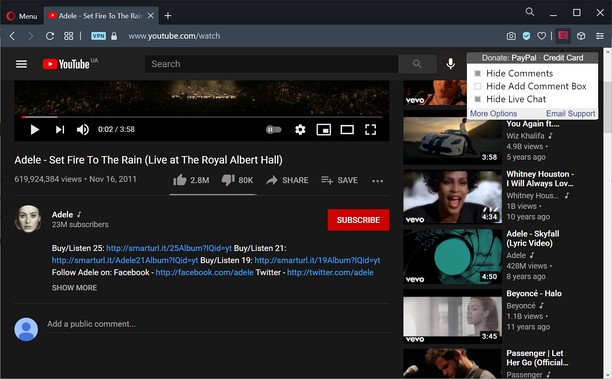
About the extension
- Downloads
- 3,240
- Category
- Productivity
- Version
- 1.0.6
- Size
- 10.1 KB
- Last update
- Jan. 25, 2023
- License
- Privacy policy
- Service website
- https://unhook.app/
Related
-

Atavi bookmarks
Visual bookmarks, bookmarks sync across various browsers and absolute safety for your bookmarks
-

Exinfo
Checks for the exchanger in a black or white list, and displays additional information about them.
-

GithubPlus
Upgrade your GitHub experience with custom enhancements and a streamlined interface.
-

Evernote Web Clipper
Use the Evernote extension to save things you see on the web into your Evernote account.
-

Snip Shot
Snip Shot is a user-friendly browser extension that simplifies the process of taking screenshots. With its one-click operation and intuitive user interface, users can quickly and easily capture any part of their screen and save it as an image. Snip Shot's minimalist design makes it a seamless addition to any browser, while its efficiency and usability make it the perfect tool for anyone who needs to take screenshots regularly.