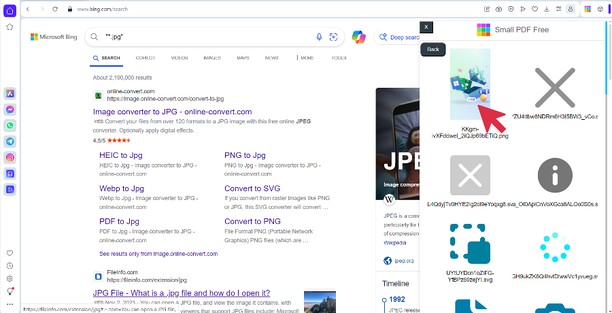
Manage your documents and images effortlessly with smallPDFfree Opera extension, designed for seamless browsing and task automation. This lightweight and versatile tool empowers you to work directly with your files, providing an array of functionalities at your fingertips.
Key Features:
Auto-Detect and Access Files Instantly
As you explore the web, the extension intelligently detects and captures all PDF files and popular image formats (JPG, JPEG, JFIF, PNG, RAW, TIFF) from the active tab. Once identified, a preview of these files appears within the extension, enabling you to interact with them quickly. Whether compressing, merging, splitting, converting, or editing, every operation is just a click away.
Complete PDF Management:
Compress PDFs: Easily reduce file size while preserving visual quality for optimized storage and sharing.
Edit PDFs: Make modifications on the go—whether adding or adjusting text, forms, signatures, annotations, or images.
OCR PDFs: Convert scanned documents into searchable, selectable text for increased accessibility.
Rotate PDFs: Adjust the orientation of any page in 90-degree increments to achieve the perfect layout.
Split PDFs: Divide large files or extract specific pages from a PDF, no matter the size.
Merge PDFs: Combine multiple PDFs and images into one file while maintaining quality.
Crop PDFs: Precisely trim unnecessary sections from your PDF pages.
Convert Files: Change your PDFs into other formats, such as Word, Excel, or PowerPoint, keeping the formatting intact. Extract valuable data by converting PDFs to JSON, XML, YAML, or PDF/A for archiving.
Superior Image Handling:
Transform your PDFs into various image formats, including JPG, PNG, PSD, RAW, TIFF, or encode them into BASE64 for secure storage. For reverse conversion, convert image formats, such as JPG, PNG, and others, back to PDF with flawless results.
Versatile File Conversions:
Convert not just PDFs, but also Word, PowerPoint, Excel, JSON, XML, JPG, PNG, PSD, RAW, TIFF, and BASE64 into well-structured PDFs, all without compromising quality.
Built-In Screenshot Tool:
Capture the exact web content you need, from full-page screenshots to selected regions. The tool allows you to instantly save and share these captures directly from Opera.
Our Opera extension eliminates the hassle of signups and limitations, offering an intuitive, robust solution for working with PDFs and images. It integrates smoothly into your browser, enabling you to handle any file task effortlessly. Perfect for professionals and casual users alike, this all-in-one extension simplifies your workflow from start to finish.


 需要使用 Opera 浏览器。