


 Neophodan je Opera pretraživač.
- Ova ekstenzija može pristupati Vašim podacima na svim web sajtovima.
- Ova ekstenzija će pristupupravljati Vašim ekstenzijama.
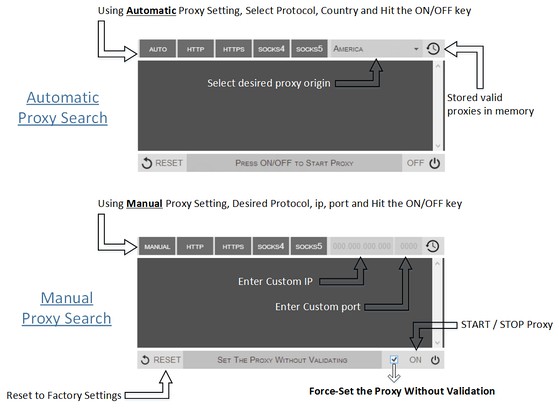
- Ova ekstenzija može pristupati Vašim proxy podešavanjima.
- Ova ekstenzija može pristupati Vašim tabovima i istoriji pretraživanja.
Snimci ekrana


O ekstenziji
- Preuzimanja
- 88.514
- Kategorija
- Produktivnost
- Verzija
- 0.1.3
- Veličina
- 52,8 KB
- Last update
- 9. септембар 2014.
- Licenca
- Copyright 2014 philiptholus
Related
-

Mouse Gestures
Extension that provides the ability to define mouse gestures that will run specific actions in your browser
-

Калькулятор металла
-

Rotate that Video Player
Improve your video experience by effortlessly rotating your video clips by 90, 180, or 270 degrees.
-

Evernote Web Clipper
Use the Evernote extension to save things you see on the web into your Evernote account.
-

Atavi bookmarks
Visual bookmarks, bookmarks sync across various browsers and absolute safety for your bookmarks