Neophodan je Opera pretraživač.
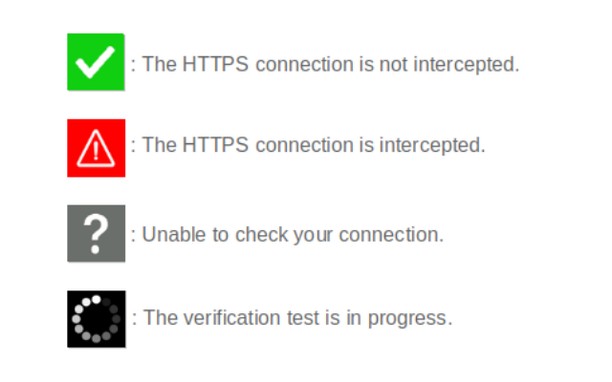
When browsing on secured sites ("https://..." websites), you can check the security status by clicking on the extension icon.
- The icon is green : your connection is not compromised;
- The icon is red : your connection is considered very risky (hijacked, modified, listened);
- The icon is gray : the verification is impossible (check server is unreachable, network error);
- The icon is black : the verification is in progress.
Technical details :
Normally, before encrypting an HTTPS connection, a secure website must prove its identity to your browser by sending it its security certificate. This certificate can be considered as an identity card issued by higher authorities (Certificate Authorities). There are several techniques of usurpation based on false certificates (false identity cards) or homographers (false names) to make you believe that a pirate site is the legitimate site you think you are visiting. These techniques allow pirate sites to retrieve your private information.
CheckMyHTTPS allows you to detect this type of practice, which can be implemented on open networks (WiFi in hotels, conference centers, stations, etc.) or even within your company via its firewall (SSL inspection). To detect this, the extension compares the certificate of the visited site that is received by your browser with the same certificate retrieved by an external check server located on the Internet. If the certificates differ, the identity of the server can be considered as usurped (red icon).
Respect for privacy :
The CheckMyHTTPS extension requires to send only two parameters to the check server :
- The domain name of the visited website;
- The IP address of the visited website.
You have free choice regarding the website to check.
Moreover, we give you the possibility to be free regarding the check server as you can make and host your own.
All explanations are detailed on the https://checkmyhttps.net project website.
- Ova ekstenzija može pristupati Vašim podacima na svim web sajtovima.
- This extension can create rich notifications and display them to you in the system tray.
- Ova ekstenzija može pristupati Vašim tabovima i istoriji pretraživanja.
Snimci ekrana
O ekstenziji
- Preuzimanja
- 1.496
- Kategorija
- Produktivnost
- Verzija
- 5.7.3
- Veličina
- 316,1 KB
- Last update
- 13. март 2026.
- Licenca
- Politika o privatnosti
- Uslužni web sajt
- https://checkmyhttps.net/
- Stranica za podršku
- https://github.com/checkmyhttps/checkmyhttps/issues
- Stranica sa izvornim kodom
- https://github.com/checkmyhttps/checkmyhttps/tree/master/Chromium
Related
-
Track English Progress: how you use languages
Learn how much time you spend on English language websites, compared to another language.
Ocjena: Ukupan broj ocjena: 2
-
Tab Discard (Suspender)
Easily suspend inactive tabs and save up memory for your browser.
Ocjena: Ukupan broj ocjena: 1
-
Atavi bookmarks
Visual bookmarks, bookmarks sync across various browsers and absolute safety for your bookmarks
Ocjena: Ukupan broj ocjena: 172
-
Stone Lotus Tree-caysenda
caysenda Is is all about stone lotus Tree
Ocjena: Ukupan broj ocjena: 1
-
Evernote Web Clipper
Use the Evernote extension to save things you see on the web into your Evernote account.
Ocjena: Ukupan broj ocjena: 632