Opera-browser vereist.
Screen Recorder addon helps you record video from the computer's screen.
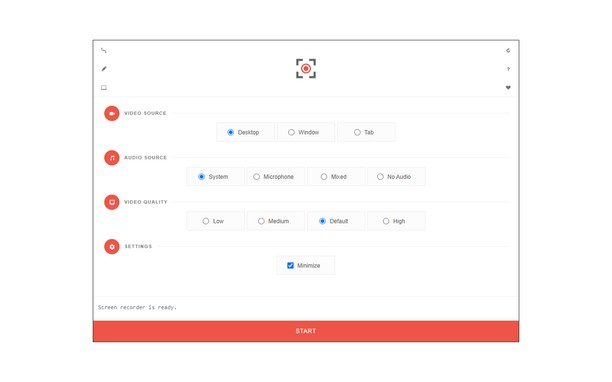
To work with this addon, please click on the toolbar button. Once the recorder interface appears, please adjust desired options, and then click the - Start - button. The video source could be your screen, window, or tab. The audio source can be the system's audio, microphone, mixed, or no audio at all. When you click the start button, a popup will appear within the interface. This popup window allows you to select the desired screen, tab, or window. To start recording please click on the - Share - button. When you are done recording the screen, please press the toolbar button (or the stop button on the app interface) to stop the recording process. The recorded video will be download to your computer automatically (on the default download location).
By default, recorded media is in - webm - format. To get more information about webm video format, please visit this Wikipedia page (https://en.wikipedia.org/wiki/WebM). If you want to change this format to a different one, please use a different software.
To report bugs, please fill the bug report form on the addon's homepage (https://mybrowseraddon.com/screen-recorder.html).
- Deze extensie kan de content vastleggen van het hele scherm of van afzonderlijke tabs en vensters.
- This extension can store an unlimited amount of client-side data.
Screenshots
Over de extensie
- Downloads
- 57.379
- Categorie
- Productiviteit
- Versie
- 0.1.5
- Grootte
- 41,6 KB
- Last update
- 1 februari 2023
- Licentie
- Copyright 2021 moristong
- Ondersteuningspagina
- https://mybrowseraddon.com/screen-recorder.html
Gerelateerd
-
Marpla
Расширение для селлеров Wildberries от сервиса Marpla
Waardering: Totaal aantal waarderingen: 0
-
Atavi bookmarks
Visuele bladwijzers, bladwijzers synchroniseren tussen diverse browsers en absolute veiligheid voor uw bladwijzers
Waardering: Totaal aantal waarderingen: 160
-
Exinfo
Checks for the exchanger in a black or white list, and displays additional information about them.
Waardering: Totaal aantal waarderingen: 2
-
Evernote Web Clipper
Gebruik de Evernote extensie om dingen die je ziet op het internet in je Evernote account op te slaan.
Waardering: Totaal aantal waarderingen: 554
-
YouTube™ No Buffer (Stop Auto-playing)
Prevents YouTube HTML5 and Flash players from auto-buffering (auto-playing) videos
Waardering: Totaal aantal waarderingen: 34