Dibutuhkan browser Opera.
Screen Recorder addon helps you record video from the computer's screen.
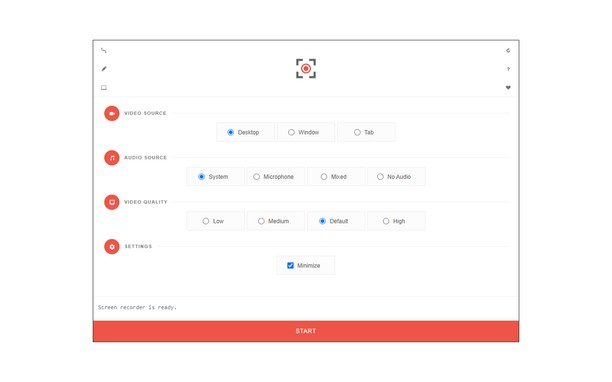
To work with this addon, please click on the toolbar button. Once the recorder interface appears, please adjust desired options, and then click the - Start - button. The video source could be your screen, window, or tab. The audio source can be the system's audio, microphone, mixed, or no audio at all. When you click the start button, a popup will appear within the interface. This popup window allows you to select the desired screen, tab, or window. To start recording please click on the - Share - button. When you are done recording the screen, please press the toolbar button (or the stop button on the app interface) to stop the recording process. The recorded video will be download to your computer automatically (on the default download location).
By default, recorded media is in - webm - format. To get more information about webm video format, please visit this Wikipedia page (https://en.wikipedia.org/wiki/WebM). If you want to change this format to a different one, please use a different software.
To report bugs, please fill the bug report form on the addon's homepage (https://mybrowseraddon.com/screen-recorder.html).
- Ekstensi ini bisa menangkap isi dari layar atau tab dan jendela.
- This extension can store an unlimited amount of client-side data.
Screenshot
Tentang ekstensi ini
- Unduh
- 50.997
- Kategori
- Produktivitas
- Versi
- 0.1.5
- Ukuran
- 41,6 KB
- Pembaruan terakhir
- 1 Feb. 2023
- Lisensi
- Copyright 2021 moristong
- Halaman dukungan
- https://mybrowseraddon.com/screen-recorder.html
Terkait
-
Blogger » Free Custom Robots.txt Generator
Create a SEO Friendly custom robots.txt file for Blogger Free and optimize your blog for search engines in 2024
Pendapat: Jumlah total pendapat: 1
-
Mouse Gestures
Extension that provides the ability to define mouse gestures that will run specific actions in your browser
Pendapat: Jumlah total pendapat: 8
-
Atavi bookmarks
Visual bookmarks, bookmarks sync across various browsers and absolute safety for your bookmarks
Pendapat: Jumlah total pendapat: 173
-
Copy URL + Title
Lets you copy URL, Title, Title + URL of All Open Tabs or Current tabs in Text or HTML format using the right click menu.
Pendapat: Jumlah total pendapat: 13
-
Evernote Web Clipper
Gunakan ekstensi Evernote untuk menyimpan hal-hal yang Anda lihat di web ke akun Evernote Anda.
Pendapat: Jumlah total pendapat: 624