Opera browser required.
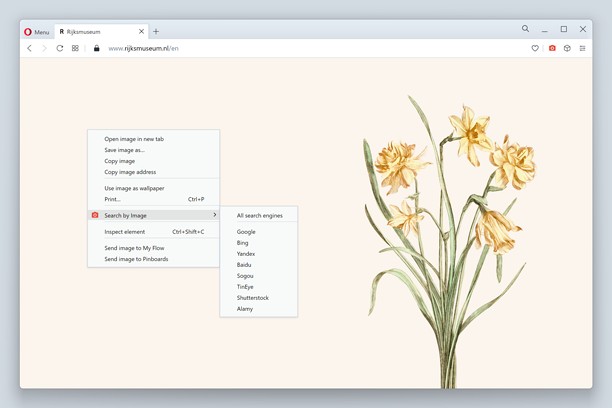
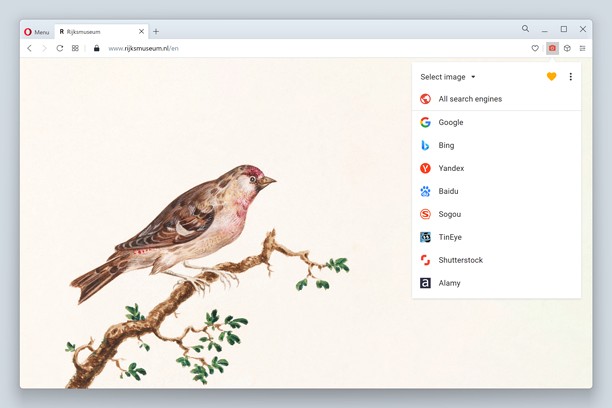
Search by Image is an Opera extension which enables you to initiate a reverse image search from the right-click context menu or the browser toolbar. It finds all images positioned in the clicked area, including those declared in CSS. The extension also supports uploading local images and searching for images from private sites.
The continued development of Search by Image is made possible thanks to the support of awesome backers. If you'd like to join them, please check out https://www.patreon.com/dessant
The "Allow access to search page results" option must be checked for the extension on the chrome://startpage/extensions page, otherwise it may not work as expected.
Search engines (toggle and reorder them from the options page):
• Google Images
• Bing Images
• Yandex.Images
• Baidu Image Search
• TinEye Reverse Image Search
• Sogou Images
• Karma Decay
• trace.moe (WhatAnime)
• SauceNAO
• Iqdb
• Ascii2d
• Getty Images
• iStock
• Shutterstock
• Adobe Stock
• Depositphotos
• Pinterest
• Qihoo 360 Images
• Jingdong
• Taobao
• Alibaba China
A handful of search modes are offered that serve different use cases. The search mode can be set independently for the context menu and browser toolbar from the options page.
Search modes:
• Select (context menu and toolbar): select an image on the page, then search for the image URL, whenever possible. Blob and data URLs will still be handled as image uploads. This is the default search mode.
• Select & upload (context menu and toolbar): select an image on the page, then fetch the image, possibly from the browser cache, and upload it. This search mode is preferred for sites which do not allow direct linking of images or are otherwise private.
• Capture (context menu and toolbar): select and capture a page area, then upload it.
• Upload (toolbar): select or drop an image from your device, or paste it from the clipboard, then upload it.
• URL (toolbar): search for an image URL.
Features:
• Search with a single engine, or all enabled ones, directly from the top-level context menu item, or the browser toolbar button (see options page)
• Detect any image on the page, including those declared in CSS and pseudo-elements
• Select the desired image from a dialog when multiple images are found
• Search for images from private sites (see search modes)
• Search for local images
• Search for the current video frame
The context menu item is always visible, unless it is disabled. Visit the wiki for more details.
https://github.com/dessant/search-by-image/wiki/Why-is-the-extension-always-visible-in-the-context-menu%3F
The extension is also available for Chrome and Firefox:
https://chrome.google.com/webstore/detail/search-by-image/cnojnbdhbhnkbcieeekonklommdnndci
https://addons.mozilla.org/en-US/firefox/addon/search_by_image/
Reviews are not monitored for bug reports, please use GitHub for issues and feature requests.
https://github.com/dessant/search-by-image
- This extension can access your data on all websites.
- This extension can access your data on some websites.
- This extension can access your tabs and browsing activity.
Screenshots
About the extension
- Downloads
- 4,942
- Category
- Search
- Version
- 1.19.0
- Size
- 339.9 KB
- Last update
- March 15, 2019
- License
- Support page
- https://github.com/dessant/search-by-image/issues
- Source code page
- https://github.com/dessant/search-by-image
Related
-
Giphy for Opera
Bring the power of a GIF search engine anywhere on the web. Respond to emails, tweets and more with GIFs quickly and easily.
Rating: 4.5 Total number of ratings: 44
-
Поиск по картинке
Search the picture in the services of Yandex, Google and TinEye
Rating: 4.5 Total number of ratings: 52
-
TinEye Reverse Image Search (Context menu)
This is the official TinEye Opera Next extension. Find out where an image came from, how it's used, or find higher resolution versions.
Rating: 4.0 Total number of ratings: 80
-
AllHYIPMonitors.com
Browse status of all hyip monitors on one page. Click to view domain details on www.allhyipmonitos.com
Rating: 4.0 Total number of ratings: 1
-
Ampare Search This on Youtube
Search Selection Text on Youtube
Rating: 4.0 Total number of ratings: 2
Feedback from users
Reviews and ratings
-
esclarrogativo says:Rating: 5Nov. 16, 2018 - Version 1.19.0 -
cupnoodle says:Rating: 5Super clean design, and it just works! Made the transition to opera a lot easier
July 19, 2018 - Version 1.16.1
Best reverse image extension