Opera-Browser erforderlich.
Window Resizer is an addon that lets you easily re-size and re-position the current window to your desired values.
Simply open toolbar popup UI and click on the desired layout set (size & position). Once you click a layout, the window will be positioned and resized to the chosen layout. There are 20 predefined layouts available to choose from in the toolbar popup.
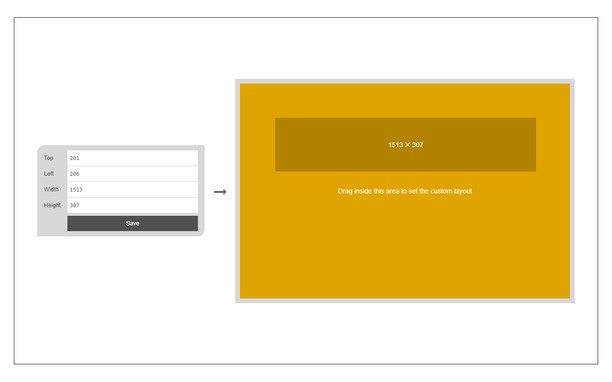
If you need a custom layout, please click on the - Add a new layout - button at the top left corner in popup UI. A new tab will be open with a custom design layout UI. Simply drag your desired size within the orange area, then click on the - Save - button to store the custom layout. The new layout will be added to the popup UI.
Note 1: icons within toolbar popup UI are draggable and the new order will be auto-saved to the memory.
Note 2: to report bugs, please fill the bug report form on the addon homepage (https://mybrowseraddon.com/window-resizer.html).
Bildschirmfotos
Über die Erweiterung
- Downloads
- 20.437
- Kategorie
- Produktivität
- Version
- 0.1.6
- Größe
- 45,4 KB
- Letztes Update
- 31. März 2023
- Lizenz
- Copyright 2023 kelvinbarko
- Supportseite
- https://mybrowseraddon.com/window-resizer.html
Ähnliche
-
Zoiper Click2Dial
Make phone numbers clickable and initiate calls from Zoiper.
Bewertung: Gesamte Bewertungen: 2
-
Evernote Web Clipper
Verwende die Evernote-Erweiterung, um Dinge, die du online entdeckst, in deinem Evernote-Konto zu speichern.
Bewertung: Gesamte Bewertungen: 632
-
Capture Webpage Screenshot - FireShot
Bildschirmfoto der komplette Webseite. Erfassen, bearbeiten und sichern des Bildschirmfotos in Formate PDF/JPEG/GIF/PGN, hochladen, druckern, senden an OneNote, Zwischenablage oder eMail.
Bewertung: Gesamte Bewertungen: 334
-
Mobile View Switcher
Switch to mobile view with one click via toolbar button.
Bewertung: Gesamte Bewertungen: 18
-
Atavi bookmarks
Synchronisation von Lesezeichen mit alle Geräten und Browsers
Bewertung: Gesamte Bewertungen: 172