需要使用 Opera 浏览器。
G App Launcher helps optimize your workflow by letting you open your most commonly-used websites from the browser toolbar. It opens shortcuts in a new tab so you can stay productive your own way.
Easy to access
Open the launcher extension from any page with just a click or through a keyboard shortcut.
Packed with more than 1,000 shortcuts
Add any Google website to the launcher or create your own shortcut to sites that you visit often. Over 1,000 shortcuts are available, including really obscure websites and action-based shortcuts. You can also add apps from Google Workspace.
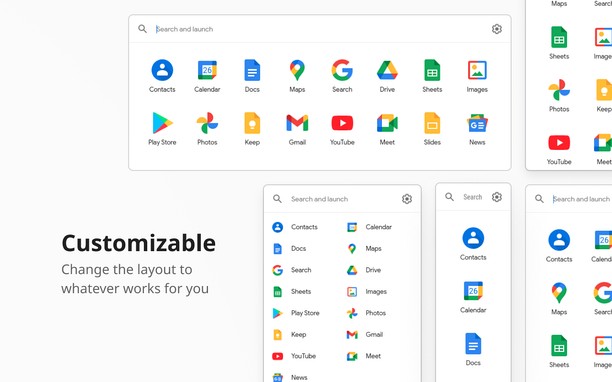
Customizable
Personalize the launcher with shortcuts of your choice, with many options for layout and appearance. Dark theme is supported.
Integrated
Launch shortcuts with the same account as the page you’re currently on. Replace the default Google app launcher with this extension to bring your shortcuts with you on Google websites.
Synced and secure
Carry your personalized launcher across devices with support for browser-based extension sync. This means only you have access to your shortcuts; these are never sent to our system.
Thoughtfully designed
Feel at home with the familiar design based on the original app launcher. Your shortcuts are accessible through keyboard navigation.
Note on permissions
We value your privacy and security. G App Launcher requires additional permissions which the browser will inform about this on installation or first use. G App Launcher only uses these permissions for:
- automatically getting the icon for websites you add manually,
- replacing the default app launcher on Google shortcuts with G App Launcher,
- making sure the shortcuts launched for Google websites are for the same account that you’re currently signed in on, and
- correctly triggering action shortcuts related to the website you’re on (such as ‘Gmail send this’ or ‘Bookmark this’).
- 此扩展可访问您在某些网站上的数据。
- This permission allows other installed extensions and web pages to communicate with this extension.
- 此扩展会向侧边栏中添加面板。
- 此扩展可访问您的标签和浏览活动。
屏幕截图
关于此扩展
- 下载次数
- 253832
- 类别
- 效率
- 版本
- 31.6.0
- 大小
- 1.4 MB
- Last update
- July 13, 2026
- 许可证
- Copyright 2026 carlosjeurissen
- 隐私政策
- 服务网站
- https://apps.jeurissen.co/g-app-launcher
- 在线支持
- https://apps.jeurissen.co/g-app-launcher/contact
相关
-
My IP
Your public IP address and other tracking info
评分: 总评分次数: 20
-
DragFree (Mouse+Char Count+Image+Capture)
在禁用了鼠标拖动、右键和图片保存的网站上重新启用这些功能。还可一键保存页面上的所有图片,附带字数统计功能,并支持页面截图(当前画面/选择区域/选择元素/滚动)。
评分: 总评分次数: 0
-
Evernote Web Clipper
使用Evernote扩展程序一键保存精彩网页内容到Evernote帐户。
评分: 总评分次数: 609
-
Atavi bookmarks
书签与所有的设备和浏览器同步
评分: 总评分次数: 169
-
Images ON/OFF
Disable images on current site.
评分: 总评分次数: 15