## Important privacy notice
- No cookie information besides the name and domain name are stored inside FlagCookies to work, no values, no direct details.
- No session data or details are stored or processed
- No history of visited domains or websites or any other tracking is used.
### Before you use this addon
This add-on is mainly aimed at power users, this might sound harsh, but it is not!
To get the most out of FlagCookies, you have to define either own cookie rules for websites and or make use of `Global Flag`, or `Auto flag`, `Profile` modes.
Also, in case you use payment services, be advised to disable the "Global flag" feature temporarily. For example when using Paypal or other shopping/payment provider websites and services.
### *Long story made short* - Basic usage
1) Use `Global mode` if you are surfing, this will remove all kind of cookies while browsing the web if not protected by `profile` mode.
2) Use `Auto flag` which will remove all cookies for one website/domain - this can be useful if you only want to automatically remove these page cookies every time you browse this website.
3) Use `Profile mode` either globally for a website, protecting all cookies of that domain if no cookies are picked as profile cookies. Or protect single cookies even when `Global flag` or `Auto flag` modes are active.
4) `Click / Flag` and set rules for each cookie individually, works together with the other modes.
### JDownloader2
Note: It is possible to export detected cookies into a json file or into the clipboard, used by JDownloader2, from the `Settings` tab inside of FlagCookies.
More information also can be found here: [JDownloader2 Knowledgebase with cookie import instructions](https://support.jdownloader.org/Knowledgebase/Article/View/account-cookie-login-instructions)
## Some features
**FlagCookies distinguishes between http(s)://domain.net and http(s)://subdomain.domain.net** for the following features:
* Detects and displays stored browser cookies, storage data, and be able to manage (flag) and delete those while browsing, either automatically through ***global*** or ***auto flag*** mode or by explicit decision
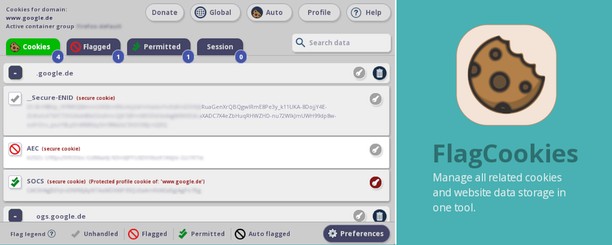
* **Flag cookies** either to be explicitly **deleted** even without *global* or *auto flag* mode or set them to be **permitted** or protected from removal by *global* or *auto flag* modes
* **Profile** mode for a domain or cookies - to switch between *logged into a website/service* and *not logged in* modes in order to remove or keep cookies on demand
* **Auto flag** mode only affecting this particular (sub)domain, removing every domain cookie which is not permitted or used as ***profile cookie***, this also includes third-party and cross origin cookies.
* Support for *Firefox Multi-Account-Containers*
* **Preferences** allowing to import and export settings to a ZIP file. Import does not work in private windows!
* **Preferences** allows to manage *logged in profile* cookies, delete all domain settings and add-on settings
* An **Action log** avaible in Preferences which provides output of what FlagCookies is doing. The **Action log** is disabled by default due to performance improvements and RAM usage - even so the log is cleared mostly on reload
* **Displays count** of deleted cookies in the browser toolbar icon and in addition a breakdown summary of the action log when hovering the toolbar icon if the action log is enabled
* Optional **notifications**
* Support for firstPartyIsolate/firstPartyDomain cookies
* Support for container tabs/contextual identities


 Cần trình duyệt Opera.