Opera tarayıcı gerekiyor.
> HOW TO USE IT: You need to install the latest version of PotPlayer to get it working - https://potplayer.daum.net <
PotPlayer is a media player developed for Windows by South Korean Internet company Kakao (formerly Daum Communications). Player can play Youtube videos and videos from any other urls if it's direct video links.
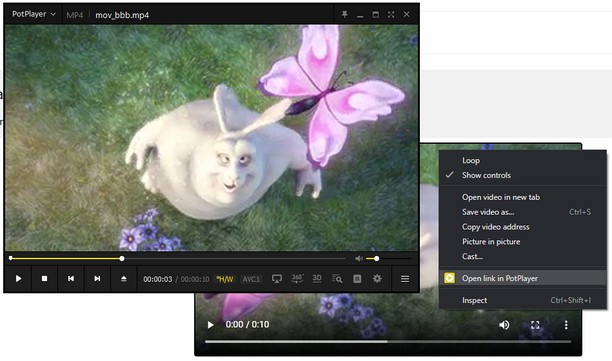
To open a Youtube video (playlist) in PotPlayer you can use the buttons on the site or you can use the menu items from the context menu (the right-click popup bar) on a Youtube link or on the actual Youtube page.
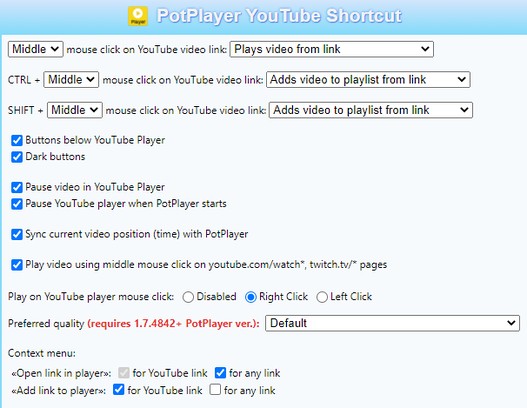
You can also use middle click on a Youtube page or a link to open it directly in the player. In order for that to work, you need to open the extension's preferences and enable the necessary features.
Optional features (disabled by default):
- auto-pause a video in Youtube player;
- pause Youtube player when Potplayer starts;
- play video using middle mouse click on youtube.com/watch* page;
- sync current video position (time) with PotPlayer;
- open a Youtube link in the player using middle mouse click on a link;
- «Open/Add link to player» in the context menu for any link
If it doesn't work for you then try to open the player's settings (key "F5"), then go to "Association" tab and check any association (e.g. ".mp4") and finally press Apply or OK button (after applying the settings you can uncheck previously checked association).
It's recommended to always update the player to the latest version of Potplayer (get the latest version: https://potplayer.daum.net).
Twitch PotPlayer requirements: https://github.com/23rd/TwitchPotPlayer
- Bu eklenti, tüm web sitelerindeki verilerinize erişebilir.
Ekran görüntüleri
Eklentiler hakkında
- İndirmeler
- 56.727
- Kategori
- Erişilebilirlik
- Sürüm
- 1.27
- Boyut
- 176,3 KB
- Son güncelleme
- 03 Aralık 2024
- Lisans
- Copyright 2024 depresjon
Alakali
-
Open in IE
Send HTML links and webpages directly to the Internet Explorer browser without copy and paste!
Oy: Toplam oy sayısı: 13
-
Backlights Bleed Test
You can conduct a backlight bleed test by opening a pitch-black image, playing a full-screen video, or using our advanced tool.
Oy: Toplam oy sayısı: 0
-
Zoom
Zoom, İnternet içinde veya dışında bir şeyleri rahatça okumanız için yazılar üzerinde yeterli yakınlaştırmayı sağlar.
Oy: Toplam oy sayısı: 192
-
Techrayss
Techrayss All You Want To Know About Sublimation World Tips, FAQs, Reviews And Buying Guides.
Oy: Toplam oy sayısı: 0
-
SkipTo.js for Opera
SkipTo.js provides keyboard navigation to landmark regions and headings to meet WCAG 2.4.1 Bypass Blocks requirement.
Oy: Toplam oy sayısı: 0