Opera tarayıcı gerekiyor.
This add-on doesn't replace the native browser download manager, but implements it by managing new features with its popup.
It is based on the extension Material Design Download Manager available on github - https://github.com/auxdesigner/Material-Design-Download-Manager
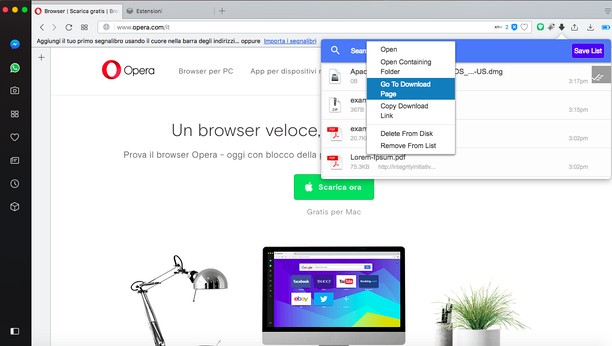
Context menu of the extension popup:
* open the file directly from the popup;
* open the folder where the file was downloaded;
* go to the download page;
* you can copy the original link where you downloaded the file
* can delete the file you downloaded from the hard disk, directly from the popup;
* can remove the downloaded file from the list;
* shows download progress.
============
Also in the popup is included the button to clean up the entire list of downloaded files and the button to save, in a single file as html format, the history of downloaded documents included in the same list. You can also do an advanced search of the downloaded files using the input at the head of the popup.
- Bu eklenti, kopyaladığınız ve yapıştırdığınız verilere erişebilir.
- This extension can write data into the clipboard.
- This extension can create rich notifications and display them to you in the system tray.
- Bu eklenti, sekmelerinize ve tarama etkinliklerinize erişebilir.
Ekran görüntüleri
Eklentiler hakkında
- İndirmeler
- 78.539
- Kategori
- İndirmeler
- Sürüm
- 0.8
- Boyut
- 644,2 KB
- Son güncelleme
- 03 Aralık 2019
- Lisans
- Destek sayfası
- https://mediamaster.eu/contatti/
- Kaynak kodu sayfası
- https://github.com/auxdesigner/Material-Design-Download-Manager
Alakali
-
Synology Download Station
Synology İndirme İstasyonu'ndaki dosyaları yönetin.
Oy: Toplam oy sayısı: 31
-
SaveFrom.net helper
Sadece bir tıklama ile YouTube, Facebook, VK.com ve 40'dan fazla siteden dosya indirin.
Oy: Toplam oy sayısı: 8639
-
Instagram download photos and videos
Beğendiğiniz fotoğrafları ve videoları İnstagram'dan iki tıklamayla indirin
Oy: Toplam oy sayısı: 161
-
Photonic Flare
Look for beautiful blurs and flares
Oy: Toplam oy sayısı: 0
-
Image Assistant
Kullanıcı (özel bir alet-kutusunda veya uygulama bağlam menüsünde (sonuncusu fakat suret nişanları için)) temin edilen bir bağlam menü unsurunu seçtiğinde suretleri haricî bir seyrettiricide açar. Bu, yakınlaştırıp-uzaklaştırma, devrettirme ve önbelirlenmiş olarak müsait olmayan diğer işleyişlere imkân verir…
Oy: Toplam oy sayısı: 2