จำเป็นต้องมี เบราเซอร์ Opera
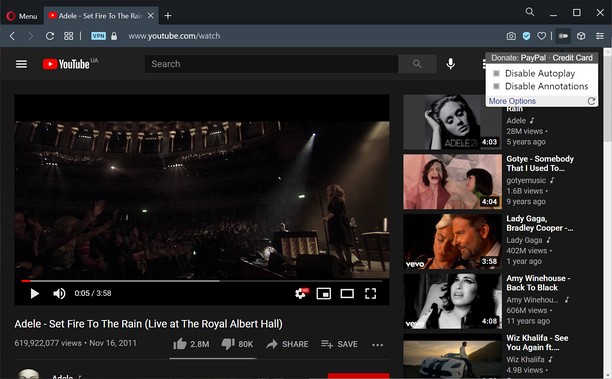
Turn off YouTube autoplay or turn off YouTube annotations. Also hides the toggle option when disabled.
Compatible with mobile and embedded YouTube videos as well.
For more features including removing recommendations, comments, and more, try the Unhook YouTube add-on: https://chrome.google.com/webstore/detail/unhook-remove-youtube-rec/khncfooichmfjbepaaaebmommgaepoid
Turn Off YouTube Autoplay Next & Annotations is available on:
- Opera: https://addons.opera.com/en/extensions/details/turn-off-youtube-autoplay-next-annotations/
- Chrome: https://chrome.google.com/webstore/detail/turn-off-youtube-autoplay/pcapooophggbaedfdmmmmbldmhlbbjob
- Firefox: https://addons.mozilla.org/firefox/addon/youtube-autoplay-annotations/
- Microsoft Edge: https://microsoftedge.microsoft.com/addons/detail/turn-off-youtube-autoplay/apdogalndjbldgojpfofdcdlmblgpjef
- ส่วนขยายนี้สามารถเข้าถึงข้อมูลของคุณในบางเว็บไซต์
สกรีนช็อต
เกี่ยวกับส่วนขยาย
- ดาวน์โหลด
- 2,071
- หมวดหมู่
- ประสิทธิภาพ
- เวอร์ชัน
- 1.0.8
- ขนาด
- 11.3 KB
- Last update
- 20 มกราคม 2023
- ใบอนุญาต
- นโยบายความเป็นส่วนตัว
- เว็บไซต์การบริการ
- https://unhook.app/
Related
-
Evernote Web Clipper
ใช้ส่วนขยาย Evernote เพื่อบันทึกสิ่งต่างๆ ที่คุณเห็นบนเว็บลงในบัญชี Evernote ของคุณ
คะแนน: จำนวนคะแนนรวมทั้งหมด: 611
-
Atavi bookmarks
Visual bookmarks, bookmarks sync across various browsers and absolute safety for your bookmarks
คะแนน: จำนวนคะแนนรวมทั้งหมด: 168
-
Textbox Auto Resizer
Automatically resizes input fields and textareas while you're typing
คะแนน: จำนวนคะแนนรวมทั้งหมด: 19
-
PytubePP Extension (FOSS)
Download your Favourite YouTube Videos Effortlessly using Pytube Post Processor CLI
คะแนน: จำนวนคะแนนรวมทั้งหมด: 2
-
YouTube™ All Flash® Player
Switch all YouTube™ Videos to Adobe Flash® Player.
คะแนน: จำนวนคะแนนรวมทั้งหมด: 11