O navegador Opera é necessário.
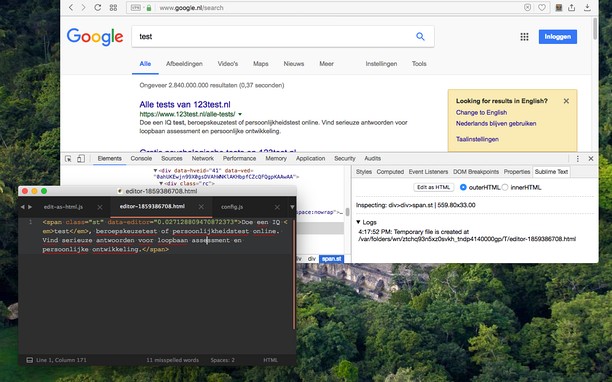
With this extension, the content of an HTML node element can be edited in Sublime Text with real-time updates upon saving of the generated temporary file.
There are two methods to send an HTML node to the Sublime Editor
1. Use the toolbar button to activate the simple inspector. Then click on the HTML node. To cancel the operation, press the Esc key.
2. Use the dev tools "Elements" panel. A new sub pane is added to this panel. Select "Edit as HTML", then select an HTML node. When you are ready, press the button to open the content in the Sublime Text editor.
Note: You can edit multiple nodes simultaneously with this extension
Note: Files are stored in the OS temporary directory, so there is no need to delete them manually
For more info please visit:
http://add0n.com/edit-as-html.html
For bug reports use:
https://github.com/belaviyo/edit-as-html/issues
- This extension can exchange messages with programs other than Opera.
- This extension can create rich notifications and display them to you in the system tray.
Capturas de tela
Sobre a extensão
- Downloads
- 5.366
- Categoria
- Ferramentas de desenvolvimento
- Versão
- 0.2.3
- Tamanho
- 185,5 KB
- Última atualização
- 24 de Agosto de 2022
- Licença
- Copyright 2022 joe-ertaba
- Site do serviço
- https://add0n.com/edit-as-html.html?from=sublime
- Página de suporte
- https://add0n.com/edit-as-html.html?from=sublime
- Página do código fonte
- https://github.com/belaviyo/edit-as-html/
Relacionados
-
MultiPass
Faça o login automático de autenticação básica HTTP usando uma expressão regular de URL.
Classificação: Número total de classificações: 4
-
Toggle Environment
Toggle between development environment url's
Classificação: Número total de classificações: 1
-
Web Developer
Adds a toolbar button with various web developer tools. The official port of the Web Developer extension for Firefox.
Classificação: Número total de classificações: 126
-
Copy Title And Url
Copy the title and url in markdown, pukiwiki, html format.
Classificação: Número total de classificações: 0
-
Picture in Play
Indicates whether the `picture` element is in use on a page.
Classificação: Número total de classificações: 7