Opera-browser vereist.
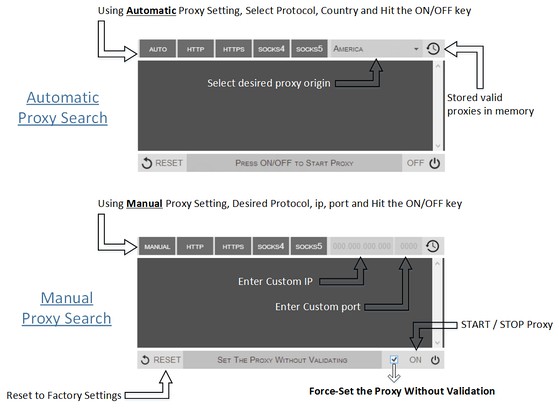
Proxy Finder (IP Switcher) is an Opera extension which automatically switches an Internet connection across one or more proxy servers. Put simply, Proxy Finder automates the manual process of editing Opera's Proxy Settings dialog. Proxy server switching occurs based on the Manual or Automatic mode you define.
In the manual mode (default) you need to choose a protocol (http, https, socks4, or socks5) and enter a desired IP and Port, then press ON/OFF button to start the proxy. For the automatic mode, the extension uses its online server to search for a working proxy based on the protocol(s) and origin you have chosen.
Moreover, animated icons show you when a proxy is in use. Advanced logging shows you which proxies were used. If you have any question or concern, feel free to contact me via the following address: philip[dot]tholus[at]gmail.com
- Deze extensie kan toegang krijgen tot je gegevens op alle websites.
- Deze extensie kan je extensies beheren.
- Deze extensie kan toegang krijgen tot je proxy-instellingen.
- Deze extensie kan toegang krijgen tot je tabs en browseactiviteit.
Screenshots
Over de extensie
- Downloads
- 89.594
- Categorie
- Productiviteit
- Versie
- 0.1.3
- Grootte
- 52,8 KB
- Last update
- 9 september 2014
- Licentie
- Copyright 2014 philiptholus
Gerelateerd
-
Evernote Web Clipper
Gebruik de Evernote extensie om dingen die je ziet op het internet in je Evernote account op te slaan.
Waardering: Totaal aantal waarderingen: 547
-
AutoTabRefresh
Refresh your browser tab automatically at the desired interval.
Waardering: Totaal aantal waarderingen: 16
-
iForum Opera
Waardering: Totaal aantal waarderingen: 4
-
Window Resizer
Verander de grootte en lijn het huidige venster uit op de voorgedefinieerde positie met multi-monitor ondersteuning
Waardering: Totaal aantal waarderingen: 3
-
Boomerang for Gmail™
Allows you to schedule messages to be sent or returned at a later date.
Waardering: Totaal aantal waarderingen: 47