Opera-browser vereist.
Preview any link in a pop-up frame without leaving current page (instead of opening a new tab), eliminating the need to go back and forth to navigate to other links. Very useful for exploring Google search results, Craigslist, Instagram, news feeds, etc. Also, search any text without leaving current page to look up for references, definitions, etc.
How to use the iFrame - Link Viewer extension:
1. Hover any link to show a tiny box on the right of the link
2. Click the tiny box to open an iFrame to preview the link
3. Drag the top bar to move the iFrame, drag the right bottom corner to resize it
4. Click outside the iFrame to close it
5. Text Search mode: Select any text to search, and click the tiny box to open search pop-up frame
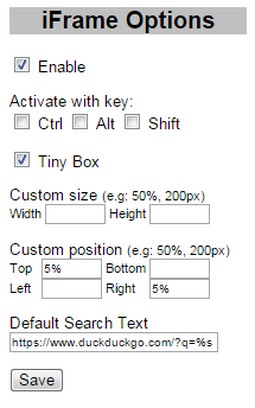
6. Option page on browser toolbar button:
- Enable/Disable
- Activate with Ctrl/Alt/Shift Key or their combination
- Show Tiny Box on link or directly show the iFrame link preview
- Custom size and position
- Default search text (leave blank to disable)
Search query examples: (don't forget %s)
https://www.google.com/search?q=%s
Note:
- Some websites do not allow to be opened in iframe, e.g: Stackoverflow
- When browsing through Google search results (or other secure sites using https), you might get "Blocked insecure content" warning, you need to Unblock the warning to allow iFrame to load previewed sites
- Deze extensie kan toegang krijgen tot je tabs en browseactiviteit.
Screenshots
Over de extensie
- Downloads
- 17.816
- Categorie
- Productiviteit
- Versie
- 0.8
- Grootte
- 9,5 KB
- Last update
- 25 augustus 2016
- Licentie
- Copyright 2016 mataherry
- Ondersteuningspagina
- http://mataherry.blogspot.com/2011/10/iframe-opera-extension-updated-for.html
- Broncodepagina
- https://github.com/mataherry/iFrame/
Gerelateerd
-
Atavi bookmarks
Visuele bladwijzers, bladwijzers synchroniseren tussen diverse browsers en absolute veiligheid voor uw bladwijzers
Waardering: Totaal aantal waarderingen: 177
-
ZNO comment
Allows you to open comments to tasks on https://zno.osvita.ua/
Waardering: Totaal aantal waarderingen: 3
-
Free Online Image Resizer
Free Online Image Resizer is a lightweight browser extension that allows you to quickly resize images without leaving your browser. With an elegant, user-friendly interface, you can adjust image dimensions with just a few clicks and download the resized images instantly. Perfect for social media posts, web graphics, or any situation where you need to quickly adjust image sizes.
Waardering: Totaal aantal waarderingen: 2
-
Evernote Web Clipper
Gebruik de Evernote extensie om dingen die je ziet op het internet in je Evernote account op te slaan.
Waardering: Totaal aantal waarderingen: 649
-
ClearView for Reddit
Simplify your Reddit browsing by auto-dismissing optional overlays and app promotion banners.
Waardering: Totaal aantal waarderingen: 0