DragFree (Mouse+Char Count+Image+Capture)
op 939d3cce-e9f6-4e7a-a89d-249579e2d96b
Opera-browser vereist.
## **Unlock Mouse Drag & Right-Click Restrictions**
If you've ever felt frustrated by being unable to select text or right-click on news articles, blogs, study materials, or shopping pages, try **DragFree**.
### **【 Key Features 】**
* **Unblock Restrictions:** Enable mouse dragging, right-clicking, text selection, copying, and pasting.
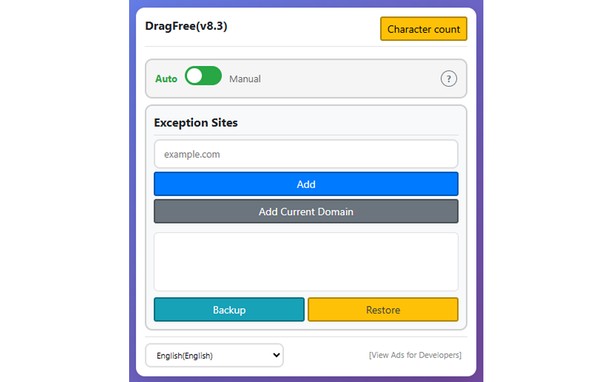
* **"Auto" Mode:** Automatically unlocks restrictions on every website you visit.
* **"Manual" Mode:** Unlock only when needed by clicking the [Unlock] button or using a shortcut.
* **View Text:** View the page's HTML/text in a new tab (extracts content even within iframes).
* **Batch Image Save:** Download all images from a page at once.
* **4 Capture Modes:** Current screen, Select area, Select element, and Full scroll page.
* **Built-in Word Counter:** Easily check the character count of any text.
### **【 How to Use 】**
* **"Manual" Mode (Recommended)**
Click the [Unlock] button on the desired page or press the shortcut (**Alt+1**) to instantly remove restrictions.
* **"Auto" Mode**
Automatically removes restrictions on all sites. If a specific site does not function correctly, use the "Register Current Domain" button to add it to the **Exceptions List**.
* **Text View Pro-Tip**
For sites with advanced protection where right-click cannot be enabled, use **[View Text]** to extract and view the content in a new tab.
### **【 Please Note 】**
* **Image Saving / Screen Capture** requires "Download" permission. Please refresh the page once after granting permission.
- Deze extensie kan toegang krijgen tot je gegevens op alle websites.
Screenshot
Over de extensie
- Downloads
- 818
- Categorie
- Productiviteit
- Versie
- 10.2
- Grootte
- 126,2 KB
- Last update
- 25 juni 2026
- Licentie
- Copyright 2026 939d3cce-e9f6-4e7a-a89d-249579e2d96b
- Privacybeleid
- Ondersteuningspagina
- https://devroid.com
Gerelateerd
-
Image Size Converter
Image Size Converter is a powerful yet user-friendly Opera extension that allows you to quickly resize images right in your browser. With an elegant interface and intuitive controls, you can modify image dimensions, choose output formats, and adjust quality settings with just a few clicks - all without relying on external websites or applications.
Waardering: Totaal aantal waarderingen: 1
-
User-Agent Switcher
Quickly and easily switch between popular user-agent strings.
Waardering: Totaal aantal waarderingen: 44
-
Atavi bookmarks
Visuele bladwijzers, bladwijzers synchroniseren tussen diverse browsers en absolute veiligheid voor uw bladwijzers
Waardering: Totaal aantal waarderingen: 171
-
Scroll navigator
Scroll any page to the top/bottom and back by left/right click on the left border of the page, horisontal scroll, scroll by entire page on mouse wheel and more.
Waardering: Totaal aantal waarderingen: 21
-
Evernote Web Clipper
Gebruik de Evernote extensie om dingen die je ziet op het internet in je Evernote account op te slaan.
Waardering: Totaal aantal waarderingen: 590