Krever Opera-nettleseren.
Volume Booster Tab raises the volume of any browser tab beyond what the page itself allows, and gives you real control over how that sound is shaped.
FEATURES
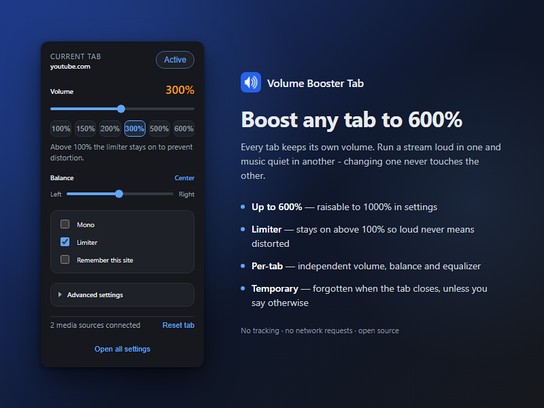
• Boost from 0% to 600%, raisable to 1000% in settings
• Limiter that prevents clipping and painful peaks when boosting
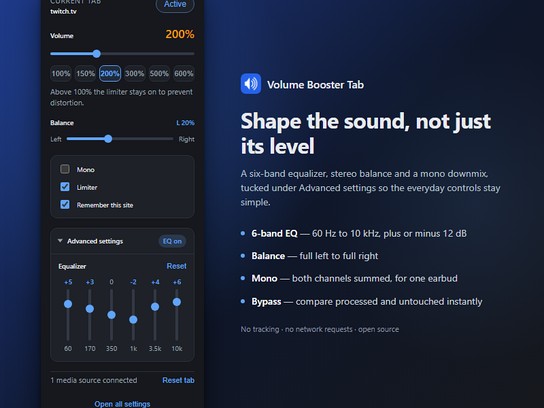
• 6-band equalizer, 60 Hz to 10 kHz, under Advanced settings
• Stereo balance, from full left to full right
• Mono downmix for listening with a single earbud
• Bypass switch to compare the processed and untouched sound instantly
• Available in 55 languages, fully translated
EVERY TAB IS INDEPENDENT
This is the part most volume boosters get wrong. Every tab keeps its own volume, its own equalizer curve, its own balance. Run a stream at 300% in one tab and music at 120% in another; changing one never touches the other.
The toolbar badge shows the level of the tab you are looking at, so you can tell at a glance which tabs are amplified.
TEMPORARY BY DEFAULT
A boost is forgotten when you close the tab. A setting you chose for one video can never surprise you weeks later on a different page.
If you do want a site to always open at the same volume, tick "Remember this site" in the popup. The settings page lists every site you have saved, lets you edit or remove any of them, and can make new tabs remember automatically.
KEEPS UP WITH STREAMING SITES
Sites like YouTube, Twitch and Kick replace their video player when you move to the next episode or stream, without reloading the page. Many boosters lose the audio at that moment and keep showing a level they are no longer applying.
This one watches for the swap and reapplies your settings to the new player, so the volume you set stays the volume you get.
PRIVACY
No tracking. No analytics. No account. No network requests of any kind, not even for fonts. Your settings never leave your own machine.
WHAT IT CANNOT DO
DRM-protected services such as Netflix, Disney+, Prime Video and Spotify hide their audio from extensions by design, so they cannot be boosted. When a page cannot be processed the popup says so plainly instead of silently doing nothing.
Browser pages such as opera:// and the add-ons catalog are off limits to every extension, including this one.
PLEASE BOOST RESPONSIBLY
High volume can damage both your hearing and your speakers, especially with headphones. The limiter is on by default above 100% and you should leave it on. Raising the ceiling past 600% in settings is at your own risk.
OPEN SOURCE
Source code, issue tracker and contribution guide: https://github.com/ramazansancar/volume-booster-tab-extension
Licensed under the GNU Affero General Public License v3.0.
- Denne utvidelsen har tilgang til dataene dine på alle nettsteder.
- Denne utvidelsen har tilgang til fanene og nettleseraktiviteten din.
Skjermbilder
Om utvidelsen
- Nedlastinger
- 32
- Kategori
- Produktivitet
- Versjon
- 0.5.1
- Størrelse
- 214,6 KB
- Last update
- 2. oktober 2026
- Lisens
- Retningslinjer for personvern
- Nettside for tjeneste
- https://github.com/ramazansancar/volume-booster-tab-extension
- Side for brukerstøtte
- https://github.com/ramazansancar/volume-booster-tab-extension/issues
- Side for kildekode
- https://github.com/ramazansancar/volume-booster-tab-extension
Related
-
Area of a Triangle
Compute area of triange give base and height of triangle or all three sides of triangle. Also computes side of triangle given others
Vurdering: Totalt antall vurderinger: 2
-
Atavi bookmarks
Visual bookmarks, bookmarks sync across various browsers and absolute safety for your bookmarks
Vurdering: Totalt antall vurderinger: 160
-
Evernote Web Clipper
Bruk Evernote-utvidelsen til å lagre ting du ser på nettet i Evernote-kontoen din. Du kan også søke gjennom notatene.
Vurdering: Totalt antall vurderinger: 555
-
Visa-Map
Interactive world visa map
Vurdering: Totalt antall vurderinger: 2
-
Sound Meter (Noise & Decibel)
Measure the surrounding sound (dB) and noise with your computer's microphone!
Vurdering: Totalt antall vurderinger: 4