Krever Opera-nettleseren.
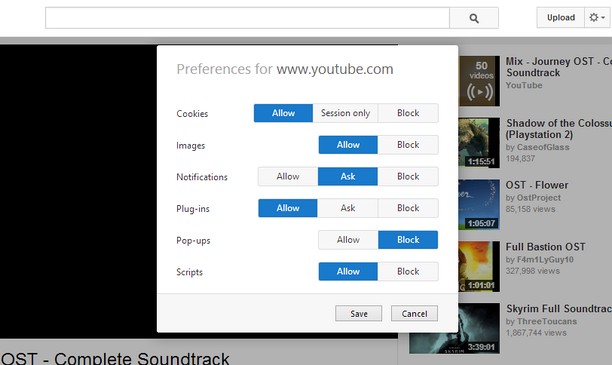
Site-specific Preferences brings back some of Opera 12's features for changing per-site settings. It lets you set whether Opera allows or blocks different types of content, such as plug-ins and pop-ups, for each site.
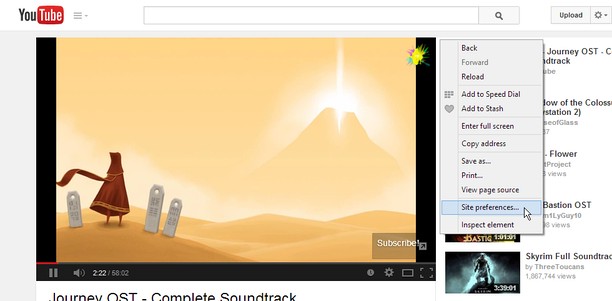
Just right-click the page background and select "Site preferences" to open the preferences for that site.
Using a certain, famous key sequence on the options page will let you allow, block or enable Click to play for individual plug-ins. This feature is experimental and might break things, so use it at your own risk.
Known Issues:
- Extensions are blocked on the Opera add-ons site, so the extension will not work here.
- The extensions API does not provide extensions with a list of the sites they have customized, so I cannot provide a centralized place to edit settings for multiple sites like in Opera 12's options page.
- Denne utvidelsen har tilgang til dataene dine på alle nettsteder.
- Denne utvidelsen kan endre innstillinger som angir om nettsteder kan bruke funksjoner som infokapsler, JavaScript og programtillegg
- Denne utvidelsen har tilgang til fanene og nettleseraktiviteten din.
Skjermbilder
Om utvidelsen
- Nedlastinger
- 14 326
- Kategori
- Produktivitet
- Versjon
- 1.2
- Størrelse
- 45,8 KB
- Last update
- 18. august 2014
- Lisens
- Side for brukerstøtte
- https://github.com/ChaosinaCan/SitePreferences/issues
- Side for kildekode
- https://github.com/ChaosinaCan/SitePreferences
Related
-
Open in PDF Viewer
Easily open desired links in a PDF viewer.
Vurdering: Totalt antall vurderinger: 8
-
Twitter Video Downloader | Fast and Free
Download Twitter Videos - Save any Twitter video and gif with one simple click. free, fast & easy to use.
Vurdering: Totalt antall vurderinger: 42
-
HireFast
HireFast automatically fills LinkedIn job applications using your resume and the job description. It generates tailored answers and cover letters, saves time, and helps you apply faster with smart, accurate responses directly inside LinkedIn.HireFast automatically fills LinkedIn job applications using your resume and the job description. It generates tailored answers and cover letters, saves time, and helps you apply faster with smart, accurate responses directly inside LinkedIn.
Vurdering: Totalt antall vurderinger: 1
-
Evernote Web Clipper
Bruk Evernote-utvidelsen til å lagre ting du ser på nettet i Evernote-kontoen din. Du kan også søke gjennom notatene.
Vurdering: Totalt antall vurderinger: 632
-
Atavi bookmarks
Visual bookmarks, bookmarks sync across various browsers and absolute safety for your bookmarks
Vurdering: Totalt antall vurderinger: 173