Krever Opera-nettleseren.
Screen Recorder addon helps you record video from the computer's screen.
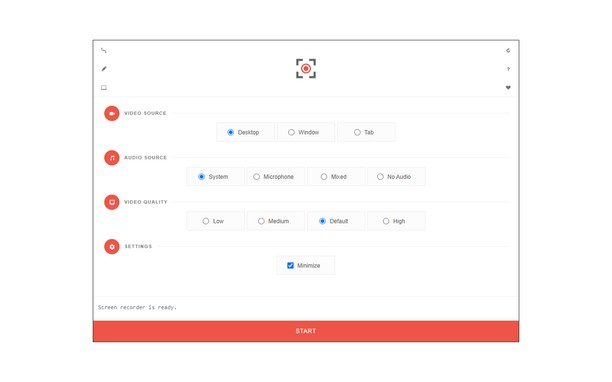
To work with this addon, please click on the toolbar button. Once the recorder interface appears, please adjust desired options, and then click the - Start - button. The video source could be your screen, window, or tab. The audio source can be the system's audio, microphone, mixed, or no audio at all. When you click the start button, a popup will appear within the interface. This popup window allows you to select the desired screen, tab, or window. To start recording please click on the - Share - button. When you are done recording the screen, please press the toolbar button (or the stop button on the app interface) to stop the recording process. The recorded video will be download to your computer automatically (on the default download location).
By default, recorded media is in - webm - format. To get more information about webm video format, please visit this Wikipedia page (https://en.wikipedia.org/wiki/WebM). If you want to change this format to a different one, please use a different software.
To report bugs, please fill the bug report form on the addon's homepage (https://mybrowseraddon.com/screen-recorder.html).
- Denne utvidelsen kan ta bilde av innholdet på hele skjermen eller på enkeltfaner og i enkeltvinduer.
- This extension can store an unlimited amount of client-side data.
Skjermbilder
Om utvidelsen
- Nedlastinger
- 38 593
- Kategori
- Produktivitet
- Versjon
- 0.1.5
- Størrelse
- 41,6 KB
- Last update
- 1. februar 2023
- Lisens
- Copyright 2021 moristong
- Side for brukerstøtte
- https://mybrowseraddon.com/screen-recorder.html
Related
-
Print
Print the current page with a single click. Quickly print website content, articles, photos, and more.
Vurdering: Totalt antall vurderinger: 29
-
Atavi bookmarks
Visual bookmarks, bookmarks sync across various browsers and absolute safety for your bookmarks
Vurdering: Totalt antall vurderinger: 177
-
Open in Chrome™
Open links in Google Chrome
Vurdering: Totalt antall vurderinger: 29
-
Evernote Web Clipper
Bruk Evernote-utvidelsen til å lagre ting du ser på nettet i Evernote-kontoen din. Du kan også søke gjennom notatene.
Vurdering: Totalt antall vurderinger: 649
-
My Navy Portal
My Navy Portal is a well-known military portal, established in 2017 and is commonly known as “MNP”, The portal offers the navy personnel a wide range of options to categorize and optimize their own personal tasks or engage with their fellow navy-men.
Vurdering: Totalt antall vurderinger: 2