Krever Opera-nettleseren.
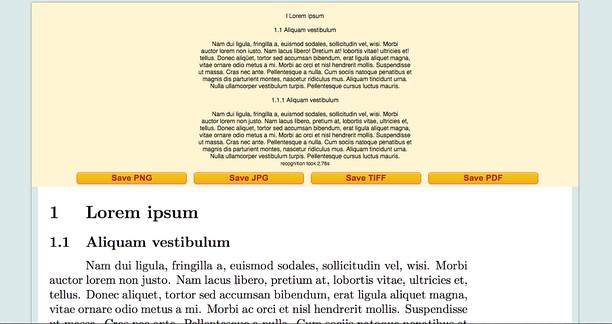
Optical Character Recognition in JS for Opera browser is web app based on ocrad.js. OCR-Web is free and You can use this application to extract text from any image you submit. Just upload your image files. OCR Web takes either a JPG, GIF, TIFF, BMP, PNG. To activate the app click on icon near address bar of your browser in which you can upload the image, with simple method drag and drop, of the document for the immediate recognition of characters.
- OCR of documents image either JPG, GIF, TIFF, BMP, PNG
- Save result in doc format in your filesystem (suppressed in v.1.5.0 you can save as txt format)
- Export result in PDF (suppressed in v.1.5.0)
- Draw letter in canvas to instant OCR (suppressed in v.1.5.0)
- Edit text directly in app, clicking on result of OCR
- Function image converter for jpg, png, tiff and PDF
==========================================
Release 1.5.1 - Fixed bug about image reader
Release 1.5.0 (Beta) - Web Extension now is based to tesseract js library
Release 1.3.0 - Convert image to OCR with online tool using context menu
Release 1.2.0 - Now you can convert image to text (Optical Character Recognition) using context menu
- Denne utvidelsen har tilgang til dataene dine på alle nettsteder.
- Denne utvidelsen har tilgang til fanene og nettleseraktiviteten din.
- This extension can store an unlimited amount of client-side data.
Skjermbilder
Om utvidelsen
- Nedlastinger
- 12 028
- Kategori
- Produktivitet
- Versjon
- 1.5.1
- Størrelse
- 385,5 KB
- Last update
- 20. september 2018
- Lisens
- Copyright 2018 ulmdesign
- Nettside for tjeneste
- https://mediamaster.eu/
Related
-
Evernote Web Clipper
Bruk Evernote-utvidelsen til å lagre ting du ser på nettet i Evernote-kontoen din. Du kan også søke gjennom notatene.
Vurdering: Totalt antall vurderinger: 609
-
YouTube URL Shortener
Shorten YouTube video URLs and share them on social media.
Vurdering: Totalt antall vurderinger: 2
-
Atavi bookmarks
Visual bookmarks, bookmarks sync across various browsers and absolute safety for your bookmarks
Vurdering: Totalt antall vurderinger: 169
-
Slope Calculator
To find the slope of a line, enter the coordinate points of the line into the required input fields, using slope finder.
Vurdering: Totalt antall vurderinger: 2
-
Magnifying Glass (Hover Zoom)
Press on the toolbar button to see the magnifying glass on the current page.
Vurdering: Totalt antall vurderinger: 6