A cluttered browser isn't a sign of disorganization. It is a defense mechanism against losing valuable thoughts.
We keep tabs open because we are afraid that if we close them, we lose the context, the research, or the task forever. But carrying that digital weight slows down your computer—and your mind.
I built LeanTabs to solve this specific anxiety. It doesn't just "suspend" tabs to save memory; it transforms them.
THE PHILOSOPHY: TABS EAT RAM. LINKS DON'T.
LeanTabs acts as a bridge between your active memory and your long-term storage. It instantly converts heavy, resource-draining tabs into a lightweight, organized "Personal Library". You get the performance of a fresh browser, with the security of knowing every thought is safely archived and instantly retrievable.
WHY LEANTABS IS DIFFERENT:
🧠 Context-Aware Intelligence
Most cleaners are ruthless—they wipe everything. LeanTabs is precise. It respects your boundaries by distinguishing between your "Current Focus" and "Background Noise".
• Workspace Mastery: Fully integrated with Opera Workspaces. You can clean up your "Work" project without accidentally killing the music playing in your "Personal" workspace.
• Active Flow: Keeps your most recent tabs open so your immediate workflow never breaks.
🛡️ Frictionless Protection
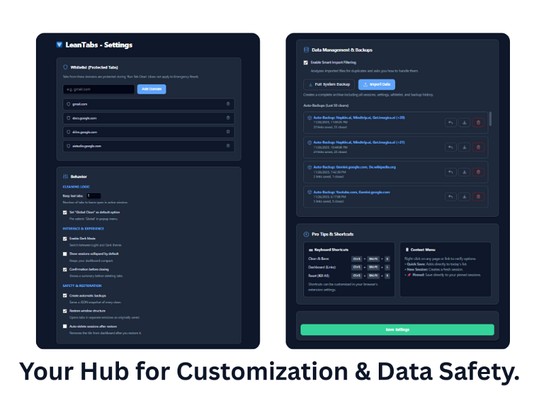
You shouldn't have to fight your tools. If you have a site you never want to close (like Email, CRM, or Spotify), simply right-click it and select "Add to Whitelist". LeanTabs will clean around it, protecting your essentials while organizing the clutter.
🗂️ From "History" to "Asset"
Browser history is a graveyard where links go to die. The LeanTabs Dashboard is a living database.
• Searchable: Find that one PDF you read three days ago in milliseconds.
• Organized: Every cleaning session is saved as a distinct card.
• Flexible: Drag & drop links to prioritize tasks or rename sessions (e.g., from "Nov 26" to "Thesis Sources").
⚡ The One-Click Context Switch
Freelancers and multitaskers know the pain of switching projects. The **Replace Button (⚡)** is the solution.
It allows you to swap mindsets instantly: One click closes your current "Client A" tabs and simultaneously opens your saved "Client B" session. It’s a complete workspace metamorphosis in under a second—without opening new windows.
🔒 The Safety Promise
Trust is the most important feature when using a tool that manages your data.
• 100% Local: Your data never leaves your machine. No cloud, no tracking, no analytics.
• Auto-Backup: The system creates a background snapshot of your last 50 cleans. Even if you accidentally delete a session, the safety net catches you.
KEYBOARD MASTERY FOR PROS:
• Ctrl+Shift+S: Clean & Save (Instant Zen)
• Ctrl+Shift+L: Open Dashboard (Your Library)
• Ctrl+Shift+K: Emergency Reset
LeanTabs is an open-source project born from my personal need for clarity. If you are ready to stop hoarding tabs and start curating knowledge, give it a try.
-----------------------------------------------
This extension is free and open source.
If it helps you regain your focus, consider supporting the development:
☕ https://ko-fi.com/ivicav


 Krever Opera-nettleseren.