Krever Opera-nettleseren.
A tool for boosting or reducing (attenuating) the levels of different frequencies of media elements in web pages.
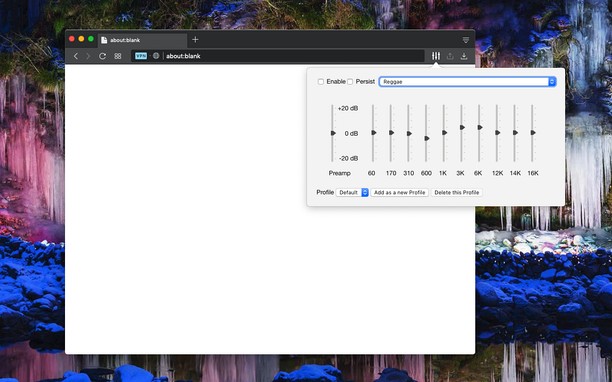
The most basic type of equalization is the bass control on the old home audio equipment to control low frequencies and the treble control to adjust high frequencies. Since there are only two controls, the adjustment is for a fairly wide range of frequencies. In this extension, however, you can adjust a wide set of frequency ranges (60, 170, 310, 600, 1K, 3K, 6K, 12K, 14K, 16K) similar to the well-known VLC player.
The extension adds a toolbar button to your browser to control audio equalization simply from its popup window. There are about 12 presets to select from or you can adjust your own levels. The extension offers profiling to keep user selections in different profiles.
This extension supports pre-amplification for each profile as well. Basically, you have a global volume control to adjust the level of each profile too.
For more info please read the FAQs page. You can submit bug reports in the GitHub page.
- Denne utvidelsen har tilgang til dataene dine på alle nettsteder.
Skjermbilder
Om utvidelsen
- Nedlastinger
- 543 878
- Kategori
- Musikk
- Versjon
- 0.2.2
- Størrelse
- 72,4 KB
- Last update
- 28. november 2022
- Lisens
- Copyright 2022 lunu-bounir
- Nettside for tjeneste
- https://add0n.com/audio-equalizer.html
- Side for brukerstøtte
- https://add0n.com/audio-equalizer.html
- Side for kildekode
- https://add0n.com/audio-equalizer.html
Related
-
Media Converter and Muxer
Easy to use video and audio converter and muxer based on FFmpeg multimedia command-line tool.
Vurdering: Totalt antall vurderinger: 4
-
YouTube™ on Hover
View YouTube while hovering mouse over a YouTube link on any website
Vurdering: Totalt antall vurderinger: 5
-
Send to MPlayer media player
Send media stream links from current tab to MPlayer media player
Vurdering: Totalt antall vurderinger: 3
-
Send to VLC (VideoLAN) media player
Send media stream links from current tab to VLC (VideoLAN) media player
Vurdering: Totalt antall vurderinger: 12
-
Picture in Picture - PiP View
Watch videos in a floating PiP window (always on top of other windows) even when tab is switched.
Vurdering: Totalt antall vurderinger: 48