Penyemak imbas Opera diperlukan.
Window Resizer is an addon that lets you easily re-size and re-position the current window to your desired values.
Simply open toolbar popup UI and click on the desired layout set (size & position). Once you click a layout, the window will be positioned and resized to the chosen layout. There are 20 predefined layouts available to choose from in the toolbar popup.
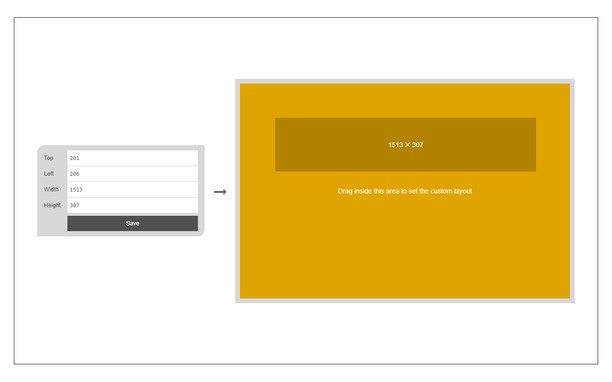
If you need a custom layout, please click on the - Add a new layout - button at the top left corner in popup UI. A new tab will be open with a custom design layout UI. Simply drag your desired size within the orange area, then click on the - Save - button to store the custom layout. The new layout will be added to the popup UI.
Note 1: icons within toolbar popup UI are draggable and the new order will be auto-saved to the memory.
Note 2: to report bugs, please fill the bug report form on the addon homepage (https://mybrowseraddon.com/window-resizer.html).
Petikan skrin
Mengenai sambungan
- Muat turun
- 20,805
- Kategori
- Produktiviti
- Versi
- 0.1.6
- Saiz
- 45.4 KB
- Last update
- 31 Mar 2023
- Lesen
- Copyright 2023 kelvinbarko
- Halaman sokongan
- https://mybrowseraddon.com/window-resizer.html
Related
-
Recently Added Photos for Google Photos
Add a button to Google Photos to easily see the last uploaded photos in your gallery
Penarafan: Jumlah bilangan penarafan: 9
-
Atavi bookmarks
Visual bookmarks, bookmarks sync across various browsers and absolute safety for your bookmarks
Penarafan: Jumlah bilangan penarafan: 171
-
Evernote Web Clipper
Gunakan sambungan Evernote untuk menyimpan bahan yang anda lihat di web ke dalam akaun Evernote anda.
Penarafan: Jumlah bilangan penarafan: 603
-
User-Agent Switcher
Quickly and easily switch between popular user-agent strings.
Penarafan: Jumlah bilangan penarafan: 46
-
Fraction Generator
Generate Fractions for copy to clipboard
Penarafan: Jumlah bilangan penarafan: 12