Penyemak imbas Opera diperlukan.
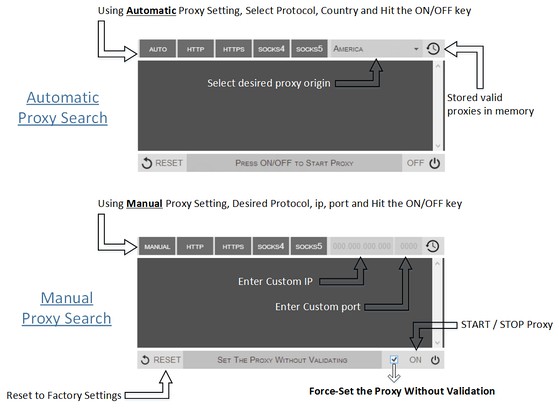
Proxy Finder (IP Switcher) is an Opera extension which automatically switches an Internet connection across one or more proxy servers. Put simply, Proxy Finder automates the manual process of editing Opera's Proxy Settings dialog. Proxy server switching occurs based on the Manual or Automatic mode you define.
In the manual mode (default) you need to choose a protocol (http, https, socks4, or socks5) and enter a desired IP and Port, then press ON/OFF button to start the proxy. For the automatic mode, the extension uses its online server to search for a working proxy based on the protocol(s) and origin you have chosen.
Moreover, animated icons show you when a proxy is in use. Advanced logging shows you which proxies were used. If you have any question or concern, feel free to contact me via the following address: philip[dot]tholus[at]gmail.com
- Sambungan ini dapat mengakses data anda di semua laman web.
- Sambungan ini akan menguruskan sambungan anda.
- Sambungan ini dapat mengakses tetapan proksi anda.
- Sambungan ini dapat mengakses aktiviti tab dan semakan imbas anda.
Petikan skrin
Mengenai sambungan
- Muat turun
- 87,465
- Kategori
- Produktiviti
- Versi
- 0.1.3
- Saiz
- 52.8 KB
- Last update
- 9 Sep 2014
- Lesen
- Copyright 2014 philiptholus
Related
-
Area of a Triangle
Compute area of triange give base and height of triangle or all three sides of triangle. Also computes side of triangle given others
Penarafan: Jumlah bilangan penarafan: 2
-
Smart RSS
RSS Reader for Opera 15+!
Penarafan: Jumlah bilangan penarafan: 188
-
Evernote Web Clipper
Gunakan sambungan Evernote untuk menyimpan bahan yang anda lihat di web ke dalam akaun Evernote anda.
Penarafan: Jumlah bilangan penarafan: 624
-
Print Selection to PDF
Select a text and print it to PDF with mouse right-click
Penarafan: Jumlah bilangan penarafan: 8
-
Atavi bookmarks
Visual bookmarks, bookmarks sync across various browsers and absolute safety for your bookmarks
Penarafan: Jumlah bilangan penarafan: 173