Opera ブラウザ が必要です。
Preview any link in a pop-up frame without leaving current page (instead of opening a new tab), eliminating the need to go back and forth to navigate to other links. Very useful for exploring Google search results, Craigslist, Instagram, news feeds, etc. Also, search any text without leaving current page to look up for references, definitions, etc.
How to use the iFrame - Link Viewer extension:
1. Hover any link to show a tiny box on the right of the link
2. Click the tiny box to open an iFrame to preview the link
3. Drag the top bar to move the iFrame, drag the right bottom corner to resize it
4. Click outside the iFrame to close it
5. Text Search mode: Select any text to search, and click the tiny box to open search pop-up frame
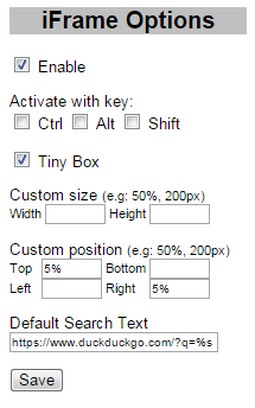
6. Option page on browser toolbar button:
- Enable/Disable
- Activate with Ctrl/Alt/Shift Key or their combination
- Show Tiny Box on link or directly show the iFrame link preview
- Custom size and position
- Default search text (leave blank to disable)
Search query examples: (don't forget %s)
https://www.google.com/search?q=%s
Note:
- Some websites do not allow to be opened in iframe, e.g: Stackoverflow
- When browsing through Google search results (or other secure sites using https), you might get "Blocked insecure content" warning, you need to Unblock the warning to allow iFrame to load previewed sites
- この拡張機能は、タブおよびブラウジングアクティビティにアクセス可能です。
スクリーンショット
拡張機能について
- ダウンロード数
- 17889
- カテゴリ
- 効率アップツール
- バージョン
- 0.8
- サイズ
- 9.5 KB
- Last update
- 2016年8月25日
- ライセンス
- Copyright 2016 mataherry
- サポートページ
- http://mataherry.blogspot.com/2011/10/iframe-opera-extension-updated-for.html
- ソースコードのページ
- https://github.com/mataherry/iFrame/
Related
-
Atavi bookmarks
全デバイスとブラウザーのブックマークを同期
評価: 評価の総数: 173
-
Redirector
Redirects URLs / modifies HTTP headers arbitrarily.
評価: 評価の総数: 12
-
Evernote Web Clipper
Evernote の拡張機能を使用して、Web 上で見つけたページを Evernote アカウントに保存します。
評価: 評価の総数: 635
-
Page Reloader
This extension will add a context menu item “Reload every” for page
評価: 評価の総数: 28
-
Snip Shot
Snip Shot is a user-friendly browser extension that simplifies the process of taking screenshots. With its one-click operation and intuitive user interface, users can quickly and easily capture any part of their screen and save it as an image. Snip Shot's minimalist design makes it a seamless addition to any browser, while its efficiency and usability make it the perfect tool for anyone who needs to take screenshots regularly.
評価: 評価の総数: 3