È richiesto il browser Opera.
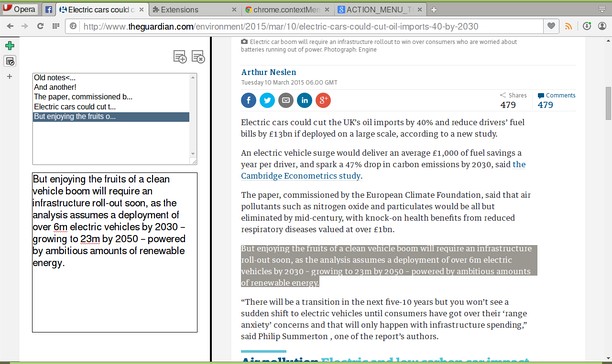
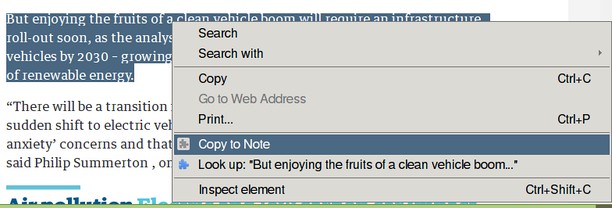
A simple note panel in HTML and JavaScript - includes a "copy to note" context menu item as well.
Use the Add Note icon - or click inside the lower text box - to add a new note. Notes are saved as you type.
Delete a note by selecting it in the list and clicking the Delete icon.
You can also copy text from a web page to a note using the context menu.
Works with Opera developer 29+.
Open source icons from PICOL.
- Questa estensione aggiungerà un pannello alla barra laterale.
Screenshot
Informazioni sull'estensione
- Scaricamenti
- 87.989
- Categoria
- Produttività
- Versione
- 1.1.4.1
- Dimensione
- 9,3 KB
- Ultimo aggiornamento
- 26 Ottobre 2017
- Licenza
- Pagina del codice sorgente
- https://github.com/coreymwamba/old-opera-notes
Correlati
-
Atavi bookmarks
Segnalibri visivi, sincronizzazione segnalibri su diversi browser e sicurezza assoluta per i tuoi segnalibri
Giudizio: Numero totale di giudizi: 170
-
Evernote Web Clipper
Usa l'estensione Evernote per salvare le cose che vedi sul Web nel tuo account Evernote.
Giudizio: Numero totale di giudizi: 610
-
Asciidoctor.js Live Preview
Render AsciiDoc (.ad, .adoc, .asc, .asciidoc) as HTML inside your browser!
Giudizio: Numero totale di giudizi: 9
-
Image Size Converter
Image Size Converter is a powerful yet user-friendly Opera extension that allows you to quickly resize images right in your browser. With an elegant interface and intuitive controls, you can modify image dimensions, choose output formats, and adjust quality settings with just a few clicks - all without relying on external websites or applications.
Giudizio: Numero totale di giudizi: 1
-
File Info
Data table HTML5 filereader web api interface with MD5/checksum
Giudizio: Numero totale di giudizi: 2