Dibutuhkan browser Opera.
ZIP Reader is an add-on that help you easily unzip a compressed file.
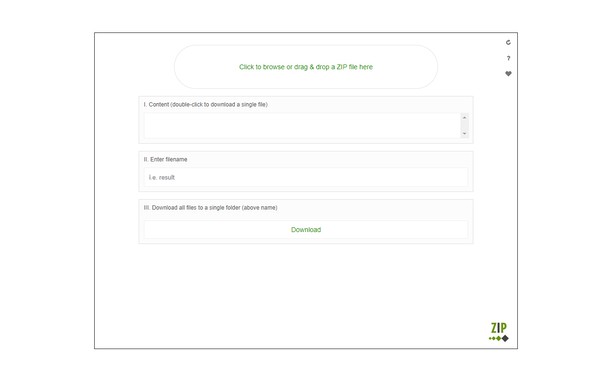
Simply drag & drop a zipped file to a designated area in the app UI (top section). All the zip content will be listed in the UI. You can download each individual file by clicking on it or download all files to single folder.
Note #1: this add-on is only designed for "reading" a ZIP file. For the inverse operation (zip a folder), you need to use a different application. There is also a reload button at the top left corner in the app UI. Clicking on this button will reload the app. If you want to extract multiple zip files, please do this one by one. It is also recommended to reload the UI after each unzip operation.
Note #2: this add-on is using an open-source JavaScript library for the unzip operation. You can get more info about this library at here: https://github.com/gildas-lormeau/zip.js/tree/master/WebContent
If you see any bug, or have a feature request in mind, please fill the bug report form in the add-on's homepage (https://mybrowseraddon.com/zip-reader.html).
Screenshot
Tentang ekstensi ini
- Unduh
- 10.094
- Kategori
- Produktivitas
- Versi
- 0.1.4
- Ukuran
- 53,6 KB
- Pembaruan terakhir
- 19 Des. 2022
- Lisensi
- Copyright 2020 loorisvalf
- Halaman dukungan
- https://mybrowseraddon.com/zip-reader.html
Terkait
-
Tab Close Plus
Tab Close Plus lets you close tabs right from the context menu.
Pendapat: Jumlah total pendapat: 11
-
Limit the Web
Set daily time limits for websites and reclaim your focus.
Pendapat: Jumlah total pendapat: 1
-
Evernote Web Clipper
Gunakan ekstensi Evernote untuk menyimpan hal-hal yang Anda lihat di web ke akun Evernote Anda.
Pendapat: Jumlah total pendapat: 611
-
IdleSwitcher
Auto-switches to a preset tab or cycle through tabs after the user becomes inactive.
Pendapat: Jumlah total pendapat: 1
-
Atavi bookmarks
Visual bookmarks, bookmarks sync across various browsers and absolute safety for your bookmarks
Pendapat: Jumlah total pendapat: 169