Dibutuhkan browser Opera.
Window Resizer is an addon that lets you easily re-size and re-position the current window to your desired values.
Simply open toolbar popup UI and click on the desired layout set (size & position). Once you click a layout, the window will be positioned and resized to the chosen layout. There are 20 predefined layouts available to choose from in the toolbar popup.
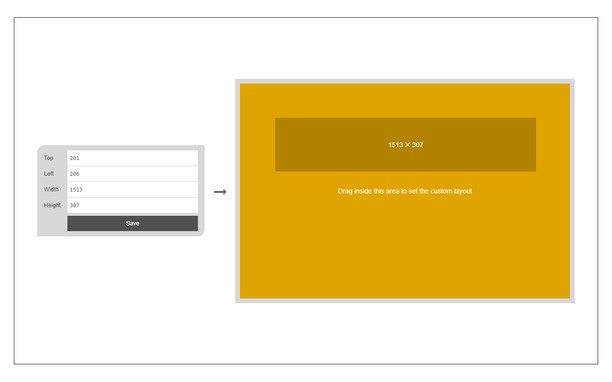
If you need a custom layout, please click on the - Add a new layout - button at the top left corner in popup UI. A new tab will be open with a custom design layout UI. Simply drag your desired size within the orange area, then click on the - Save - button to store the custom layout. The new layout will be added to the popup UI.
Note 1: icons within toolbar popup UI are draggable and the new order will be auto-saved to the memory.
Note 2: to report bugs, please fill the bug report form on the addon homepage (https://mybrowseraddon.com/window-resizer.html).
Screenshot
Tentang ekstensi ini
- Unduh
- 20.437
- Kategori
- Produktivitas
- Versi
- 0.1.6
- Ukuran
- 45,4 KB
- Pembaruan terakhir
- 31 Maret 2023
- Lisensi
- Copyright 2023 kelvinbarko
- Halaman dukungan
- https://mybrowseraddon.com/window-resizer.html
Terkait
-
Pythagoras Theorem
Calculates sides of right angled triangle using Pythagoras Theorem Calculator. Give two sides, third can be computed using this
Pendapat: Jumlah total pendapat: 3
-
Atavi bookmarks
Visual bookmarks, bookmarks sync across various browsers and absolute safety for your bookmarks
Pendapat: Jumlah total pendapat: 172
-
Evernote Web Clipper
Gunakan ekstensi Evernote untuk menyimpan hal-hal yang Anda lihat di web ke akun Evernote Anda.
Pendapat: Jumlah total pendapat: 632
-
iCloud™ Notifier
Get Badge notification for iCloud and instant access to your inbox with just one click.
Pendapat: Jumlah total pendapat: 14
-
Workspace Tab Counter
A tab counter specifically for GX, which counts tabs per workspace too.
Pendapat: Jumlah total pendapat: 7