Dibutuhkan browser Opera.
Bulk URL Opener just lets you open multiple URLs at once (in new tabs or windows).
Usage: Enter each URL in new line (you can paste the list if you prefer) and click the "Open All" button. The app will the open all the pages in separate tabs or windows (depending on your settings).
If an URL doesn't include scheme, it will default to HTTP. In other words, you may skip the protocol part for "http://" sites and enter only the meaningful part. For example -- if you type "domain.com" it will be automatically translated to "http://domain.com".
- Ekstensi ini bisa mengakses data yang Anda salin dan tempel.
- This extension can write data into the clipboard.
- Ekstensi ini bisa mengakses tab dan aktivitas browsing Anda.
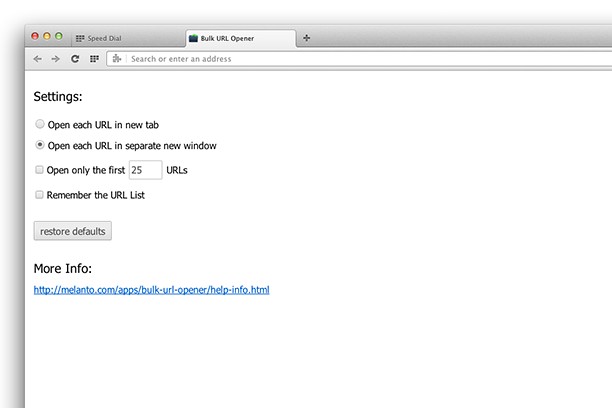
Screenshot
Tentang ekstensi ini
- Unduh
- 29.895
- Kategori
- Produktivitas
- Versi
- 1.0.0.2
- Ukuran
- 41,6 KB
- Pembaruan terakhir
- 3 April 2015
- Lisensi
- Copyright 2015 melanto
Terkait
-
TrustPlugin
Расширение для браузера «TrustPlugin»
Pendapat: Jumlah total pendapat: 3
-
YouTube Ad Muter
Automatically mute sound for YouTube ads
Pendapat: Jumlah total pendapat: 12
-
Atavi bookmarks
Visual bookmarks, bookmarks sync across various browsers and absolute safety for your bookmarks
Pendapat: Jumlah total pendapat: 176
-
Evernote Web Clipper
Gunakan ekstensi Evernote untuk menyimpan hal-hal yang Anda lihat di web ke akun Evernote Anda.
Pendapat: Jumlah total pendapat: 649
-
Snip Shot
Snip Shot is a user-friendly browser extension that simplifies the process of taking screenshots. With its one-click operation and intuitive user interface, users can quickly and easily capture any part of their screen and save it as an image. Snip Shot's minimalist design makes it a seamless addition to any browser, while its efficiency and usability make it the perfect tool for anyone who needs to take screenshots regularly.
Pendapat: Jumlah total pendapat: 3