Le navigateur Opera est nécessaire.
Window Resizer is an addon that lets you easily re-size and re-position the current window to your desired values.
Simply open toolbar popup UI and click on the desired layout set (size & position). Once you click a layout, the window will be positioned and resized to the chosen layout. There are 20 predefined layouts available to choose from in the toolbar popup.
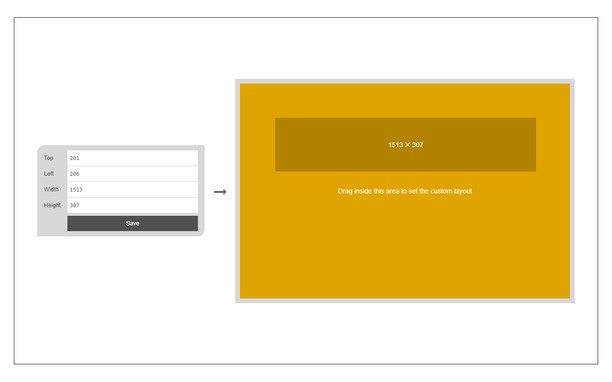
If you need a custom layout, please click on the - Add a new layout - button at the top left corner in popup UI. A new tab will be open with a custom design layout UI. Simply drag your desired size within the orange area, then click on the - Save - button to store the custom layout. The new layout will be added to the popup UI.
Note 1: icons within toolbar popup UI are draggable and the new order will be auto-saved to the memory.
Note 2: to report bugs, please fill the bug report form on the addon homepage (https://mybrowseraddon.com/window-resizer.html).
Copies d'écran
À propos de l'extension
- Téléchargements
- 20 750
- Catégorie
- Productivité
- Version
- 0.1.6
- Taille
- 45,4 Kio
- Dernière mise à jour
- 31 mars 2023
- Licence
- Copyright 2023 kelvinbarko
- Page de support
- https://mybrowseraddon.com/window-resizer.html
Similaires
-
PytubePP Extension (FOSS)
Download your Favourite YouTube Videos Effortlessly using Pytube Post Processor CLI
Note : Nombre total de notes : 2
-
Page Screenshot
Take a screenshot from the entire website with just one click!
Note : Nombre total de notes : 50
-
Evernote Web Clipper
Utilisez l’extension Evernote pour enregistrer ce que vous voyez sur le Web dans votre compte Evernote.
Note : Nombre total de notes : 610
-
Percentage Calculator
Simplify percentage calculations with ease.
Note : Nombre total de notes : 3
-
Atavi bookmarks
Synchronisations des marque-pages sur tous vos ordinateurs, appareils et navigateurs
Note : Nombre total de notes : 170