Le navigateur Opera est nécessaire.
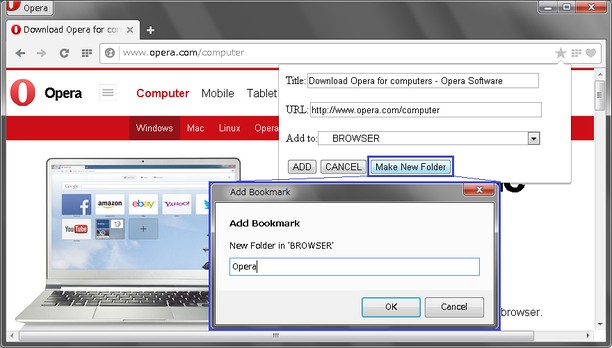
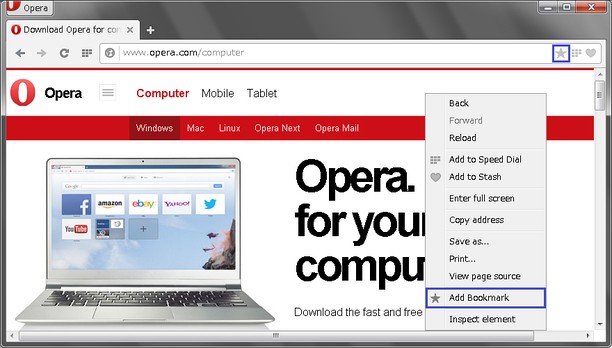
This extension adds bookmark by icon in address bar or Right-Click Menu("Add Bookmark").
NEW : Icon color change between green and grey, when (un)bookmarked.
NEW : New option to hide 'Other Bookmarks'
What you can do with this extension:
* Bookmarking from address bar
- Title and url are editable
- Specifiable a target folder
- Creatable new folder
* Bookmarking from Right-Click menu (default)
- you can choose whether using dialog or not (from Options page)
(a) if use, you can get accessibility like Classic Opera
-- Title and url are editable
-- Specifiable a target folder
-- Creatable new folder
(b) if not use, you can bookmark quickly
-- Quick bookmarking !
-- Saved to "Bookmark Bar" folder automatically
--
Added Bookmark is accessible on Bookmarks Bar.
Also, you can use other bookmarks extensions to access Bookmarks.
This extension is developing. Your comments and feedback are welcomed. Thank you in advance.
- This Extension can read and modify bookmarks.
- Cette extension peut accéder à vos onglets et vos activités de navigation.
Copies d'écran
À propos de l'extension
- Téléchargements
- 53 538
- Catégorie
- Productivité
- Version
- 1.1.6
- Taille
- 6,5 Kio
- Dernière mise à jour
- 24 septembre 2015
- Licence
- Copyright 2015 shucream0808
Similaires
-
Evernote Web Clipper
Utilisez l’extension Evernote pour enregistrer ce que vous voyez sur le Web dans votre compte Evernote.
Note : Nombre total de notes : 553
-
QR – QR Codes
Show QR code™ representing url of current tab or right clicked link
Note : Nombre total de notes : 23
-
Atavi bookmarks
Synchronisations des marque-pages sur tous vos ordinateurs, appareils et navigateurs
Note : Nombre total de notes : 160
-
Improve tabs by clicking
A pop-up window with multiple links of your choice and a context menu that adds new functions for managing open tabs.
Note : Nombre total de notes : 5
-
40gradosproducciones
40 Grados Producciones:Your one-stop solution for international film productions in Panama,
Note : Nombre total de notes : 1