Le navigateur Opera est requis.
Screen Recorder addon helps you record video from the computer's screen.
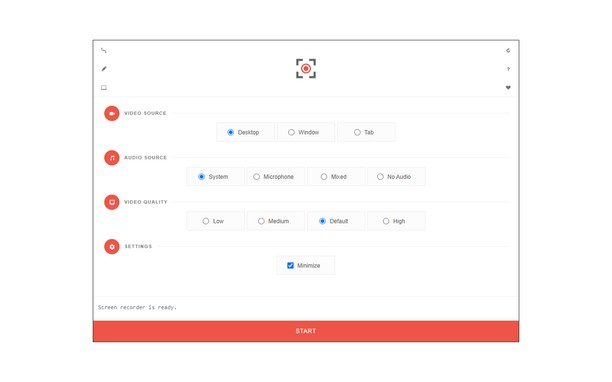
To work with this addon, please click on the toolbar button. Once the recorder interface appears, please adjust desired options, and then click the - Start - button. The video source could be your screen, window, or tab. The audio source can be the system's audio, microphone, mixed, or no audio at all. When you click the start button, a popup will appear within the interface. This popup window allows you to select the desired screen, tab, or window. To start recording please click on the - Share - button. When you are done recording the screen, please press the toolbar button (or the stop button on the app interface) to stop the recording process. The recorded video will be download to your computer automatically (on the default download location).
By default, recorded media is in - webm - format. To get more information about webm video format, please visit this Wikipedia page (https://en.wikipedia.org/wiki/WebM). If you want to change this format to a different one, please use a different software.
To report bugs, please fill the bug report form on the addon's homepage (https://mybrowseraddon.com/screen-recorder.html).
- Cette extension peut saisir le contenu de l'écran en entier ou d'onglets individuels ou fenêtres.
- This extension can store an unlimited amount of client-side data.
Saisies d'écran
À propos de l'extension
- Téléchargements
- 58 212
- Catégorie
- Productivité
- Version
- 0.1.5
- Taille
- 41,6 Kio
- Dernière mise à jour
- 1 février 2023
- Conditions d'utilisation
- Copyright 2021 moristong
- Page d'assistance
- https://mybrowseraddon.com/screen-recorder.html
Related
-
Boomerang for Gmail™
Allows you to schedule messages to be sent or returned at a later date.
Pointage: Nombre maximal d'évaluations: 46
-
pyGet P2P file sharing
pyGet lets you share files with remote computers and smart-phones without the need of any plugins.
Pointage: Nombre maximal d'évaluations: 6
-
Reload Image
Reload images in Tab/Window using context menu.
Pointage: Nombre maximal d'évaluations: 9
-
Evernote Web Clipper
Utilisez l’extension Evernote pour enregistrer ce que vous voyez sur le Web dans votre compte Evernote.
Pointage: Nombre maximal d'évaluations: 554
-
Simple Photo Editor
Your easy and simple photo editor for your Browser
Pointage: Nombre maximal d'évaluations: 5