Opera browser required.
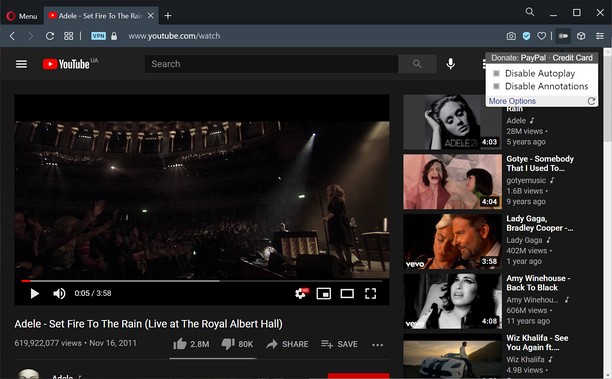
Turn off YouTube autoplay or turn off YouTube annotations. Also hides the toggle option when disabled.
Compatible with mobile and embedded YouTube videos as well.
For more features including removing recommendations, comments, and more, try the Unhook YouTube add-on: https://chrome.google.com/webstore/detail/unhook-remove-youtube-rec/khncfooichmfjbepaaaebmommgaepoid
Turn Off YouTube Autoplay Next & Annotations is available on:
- Opera: https://addons.opera.com/en/extensions/details/turn-off-youtube-autoplay-next-annotations/
- Chrome: https://chrome.google.com/webstore/detail/turn-off-youtube-autoplay/pcapooophggbaedfdmmmmbldmhlbbjob
- Firefox: https://addons.mozilla.org/firefox/addon/youtube-autoplay-annotations/
- Microsoft Edge: https://microsoftedge.microsoft.com/addons/detail/turn-off-youtube-autoplay/apdogalndjbldgojpfofdcdlmblgpjef
- This extension can access your data on some websites.
Screenshots
About the extension
- Downloads
- 1,625
- Category
- Productivity
- Version
- 1.0.8
- Size
- 11.3 KB
- Last update
- Jan. 20, 2023
- License
- Privacy policy
- Service website
- https://unhook.app/
Related
-
Evernote Web Clipper
Use the Evernote extension to save things you see on the web into your Evernote account.
Rating: Total number of ratings: 652
-
Badge counter for Gmail
Get badge counter for a custom user search query. Click on the toolbar button opens the newest email.
Rating: Total number of ratings: 3
-
Spelling Bee Solver
As avid Spelling Bee enthusiasts ourselves, we understand the frustration that can come with not being able to find all the words within the allotted time.
Rating: Total number of ratings: 4
-
Skim the clipboard
Clipboard filtering with regular expression
Rating: Total number of ratings: 1
-
Atavi bookmarks
Visual bookmarks, bookmarks sync across various browsers and absolute safety for your bookmarks
Rating: Total number of ratings: 177