Opera browser required.
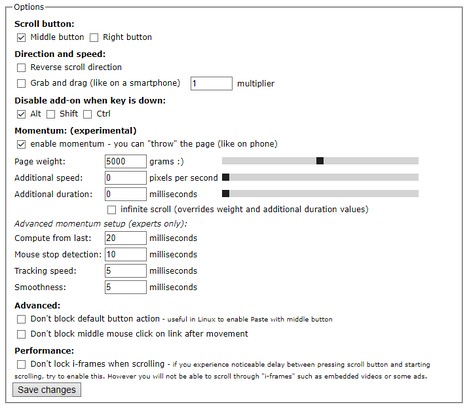
Scroll Anywhere enables you to drag scrollbar with your middle (or right) mouse button without touching a scrollbar.
Just hold the middle button and move mouse up-down or left-right.
You can also change the behavior to simple "grab and drag" style.
Supports also Momentum - ability to throw the page (like on your phone) - including infinite scrolling option.
Now with the option to change the cursor while scrolling!
Warning: very addictive! :)
Preview: https://fastaddons.com
Known issues:
- does not work HERE on https://addons.opera.com/en/extensions/ (blocked by Opera)
- does not work on browser specific pages like "History" or "Extensions" (blocked by Opera)
- does not work on other extensions pages like options page of some addon (blocked by Opera)
- in Linux right click (context menu) cannot be canceled so only middle button is working correctly
Note:
I'm developing this add-on in my free time for you for free.
Please consider supporting my work by becoming my patron:
https://www.patreon.com/fastaddons
Or by donation:
https://paypal.me/fastaddons
Thank you :)
- This extension can access your data on all websites.
Screenshots
About the extension
- Downloads
- 18,312
- Category
- Productivity
- Version
- 6.5.2
- Size
- 111.6 KB
- Last update
- April 11, 2019
- License
- Privacy policy
- Support page
- https://fastaddons.com/
Related
-
Youtube Subscriptions Transfer
Transferring subscriptions from one YouTube account to another YouTube Subscriptions Transfer is a browser extension that allows you to transfer or move subscriptions from one account to another using XPath or API. The extension collects a list of channels and enables you to subscribe or unsubscribe to each channel. It interacts with the DOM using xpath and YouTube Data API v3.
Rating: Total number of ratings: 1
-
Atavi bookmarks
Visual bookmarks, bookmarks sync across various browsers and absolute safety for your bookmarks
Rating: Total number of ratings: 171
-
Cars show
A Journey Through Automotive Excellence
Rating: Total number of ratings: 5
-
Image Size Converter
Image Size Converter is a powerful yet user-friendly Opera extension that allows you to quickly resize images right in your browser. With an elegant interface and intuitive controls, you can modify image dimensions, choose output formats, and adjust quality settings with just a few clicks - all without relying on external websites or applications.
Rating: Total number of ratings: 1
-
Evernote Web Clipper
Use the Evernote extension to save things you see on the web into your Evernote account.
Rating: Total number of ratings: 633