Opera browser required.
Reader View add-on enables you to open any website in a simple and clutter-free environment.
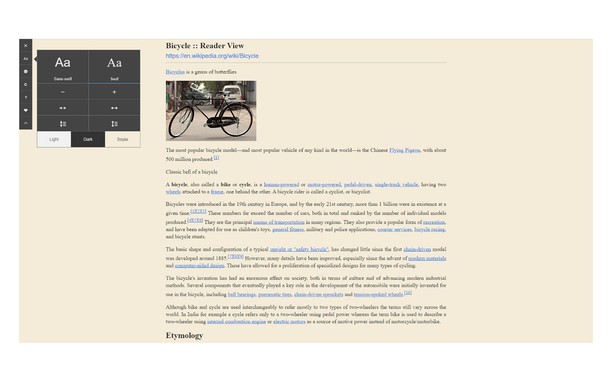
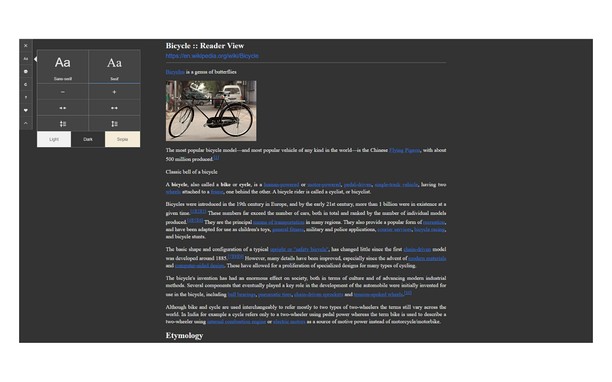
Simply click on the toolbar button to open the reader view UI. The current page will be reloaded in a plain format. Once the reader view UI is open, you can see a toolbar in the top left corner. Click on the second button from the top to open the settings popup. There are three themes available for reader view. The default theme is the - Light - color. But you can choose, Dark or Sepia options as well. Moreover, font-size, line-height, and page-width can also be adjusted in the settings popup. The reader view is a format with minimal distractions. No, buttons, toolbars, background images, ads, or banners are allowed in reader view. This view is much easier on your eyes and reduces eye strain if you spend a long time surfing the web. Please note that all changes are auto-saved to the memory in the add-on.
Note: reader view add-on uses an open-source library to render the page in a simple format. You can get more info about this library at this GitHub repo: https://github.com/mozilla/readability
To report bugs, please fill the bug report form in the addon's homepage: https://mybrowseraddon.com/reader-view.html
Screenshots
About the extension
- Downloads
- 11,088
- Category
- Productivity
- Version
- 0.1.2
- Size
- 45.2 KB
- Last update
- Jan. 20, 2023
- License
- Copyright 2021 muyor
- Support page
- https://mybrowseraddon.com/reader-view.html
Related
-
TimeZone Converter
Select any time on a page to instantly convert it to your local timezone.
Rating: Total number of ratings: 2
-
Boomerang for Gmail™
Allows you to schedule messages to be sent or returned at a later date.
Rating: Total number of ratings: 46
-
Evernote Web Clipper
Use the Evernote extension to save things you see on the web into your Evernote account.
Rating: Total number of ratings: 554
-
Black Menu for Wikipedia
Easy access to the Wikipedia universe
Rating: Total number of ratings: 9
-
Fire Time Tracker
Track and limit time your activity in the browser every day.
Rating: Total number of ratings: 4