Opera browser required.
Text to Speech (TTS) is a text-to-speech extension with natural sounding voices by using HTML5 TTS APIs.
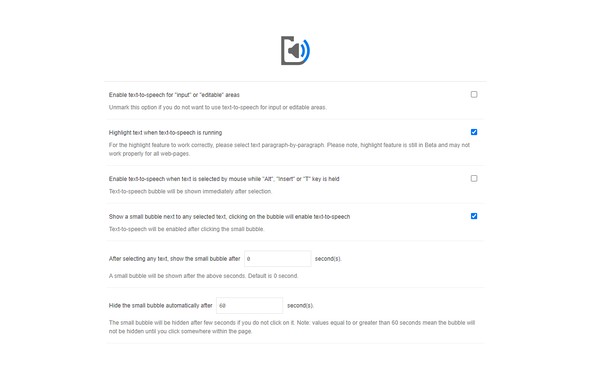
You can use this extension in a standalone interface or within web pages. If you press the toolbar button the first interface opens up where you can enter a desired text for TTS. On the other hand, within a webpage, once you select a text, a placeholder speaker icon appears. Once you click the speaker icon, the text-to-speech starts. For the highlight feature to work correctly, please select text paragraph-by-paragraph. Please note that the highlight feature is still in Beta and may not work properly on all websites. There are also a few options related to the in-page text-to-speech which can be adjusted from the extension settings page.
To report Bugs, please visit the addon's homepage (https://mybrowseraddon.com/text-to-speech.html) and fill out the bug report form.
- This extension can access your data on all websites.
Screenshots
About the extension
- Downloads
- 131,336
- Category
- Productivity
- Version
- 0.2.8
- Size
- 57.3 KB
- Last update
- Jan. 7, 2025
- License
- Copyright 2025 mornicolhkher
- Support page
- https://mybrowseraddon.com/text-to-speech.html
Related
-
iCloud™ Notifier
Get Badge notification for iCloud and instant access to your inbox with just one click.
Rating: Total number of ratings: 14
-
Web Apps by 123apps
Edit, Convert, Create
Rating: Total number of ratings: 210
-
Atavi bookmarks
Visual bookmarks, bookmarks sync across various browsers and absolute safety for your bookmarks
Rating: Total number of ratings: 173
-
Evernote Web Clipper
Use the Evernote extension to save things you see on the web into your Evernote account.
Rating: Total number of ratings: 636
-
EX.UA/FS.UA без рекламы
Allows to disable the ad units: in the top, between the elements of the list, at the homepage, as well as on the search pages.
Rating: Total number of ratings: 9