Opera browser required.
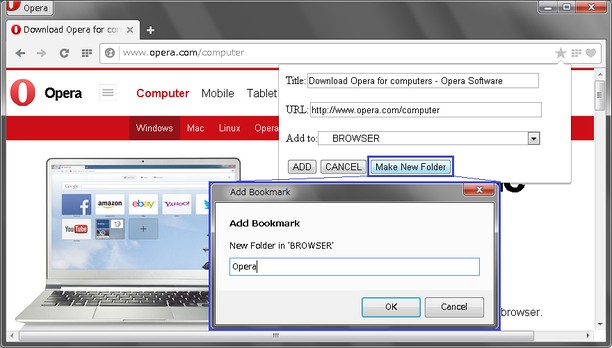
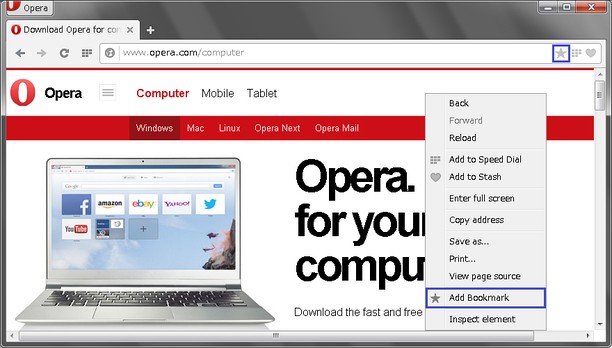
This extension adds bookmark by icon in address bar or Right-Click Menu("Add Bookmark").
NEW : Icon color change between green and grey, when (un)bookmarked.
NEW : New option to hide 'Other Bookmarks'
What you can do with this extension:
* Bookmarking from address bar
- Title and url are editable
- Specifiable a target folder
- Creatable new folder
* Bookmarking from Right-Click menu (default)
- you can choose whether using dialog or not (from Options page)
(a) if use, you can get accessibility like Classic Opera
-- Title and url are editable
-- Specifiable a target folder
-- Creatable new folder
(b) if not use, you can bookmark quickly
-- Quick bookmarking !
-- Saved to "Bookmark Bar" folder automatically
--
Added Bookmark is accessible on Bookmarks Bar.
Also, you can use other bookmarks extensions to access Bookmarks.
This extension is developing. Your comments and feedback are welcomed. Thank you in advance.
- This Extension can read and modify bookmarks.
- This extension can access your tabs and browsing activity.
Screenshots
About the extension
- Downloads
- 53,297
- Category
- Productivity
- Version
- 1.1.6
- Size
- 6.5 KB
- Last update
- Sept. 24, 2015
- License
- Copyright 2015 shucream0808
Related
-
Evernote Web Clipper
Use the Evernote extension to save things you see on the web into your Evernote account.
Rating: Total number of ratings: 610
-
Atavi bookmarks
Visual bookmarks, bookmarks sync across various browsers and absolute safety for your bookmarks
Rating: Total number of ratings: 170
-
BookMacster Sync
Empowers BookMacster, Markster, Synkmark to sync bookmarks, sends info on current page, notifies of bookmarks changes
Rating: Total number of ratings: 3
-
techzgaming.com
The concept of Techz Gaming is to provide the best recommendations based on honest reviews. It aims to guide and address users’ inquiries about various technology products, including motherboards, laptops, gadgets, and processors.
Rating: Total number of ratings: 0
-
Rotate that Video Player
Improve your video experience by effortlessly rotating your video clips by 90, 180, or 270 degrees.
Rating: Total number of ratings: 6