


 Opera-Browser erforderlich.
- Diese Erweiterung kann auf Ihre Daten auf allen Webseiten zugreifen.
- Diese Erweiterung wird Ihre Erweiterungen verwalten.
- Diese Erweiterung kann auf Ihre Proxy-Einstellungen zugreifen.
- Diese Erweiterung kann auf Ihre Tabs und Browseraktivitäten zugreifen.
Bildschirmfotos

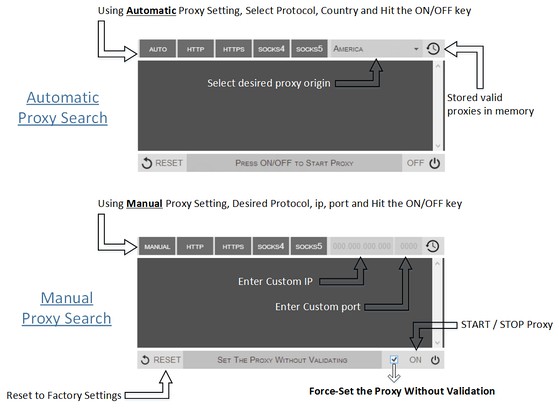

Über die Erweiterung
- Downloads
- 89.149
- Kategorie
- Produktivität
- Version
- 0.1.3
- Größe
- 52,8 KB
- Letztes Update
- 9. September 2014
- Lizenz
- Copyright 2014 philiptholus
Ähnliche
-

Boomerang for Gmail™
Allows you to schedule messages to be sent or returned at a later date.
-

Snip Shot
Snip Shot is a user-friendly browser extension that simplifies the process of taking screenshots. With its one-click operation and intuitive user interface, users can quickly and easily capture any part of their screen and save it as an image. Snip Shot's minimalist design makes it a seamless addition to any browser, while its efficiency and usability make it the perfect tool for anyone who needs to take screenshots regularly.
-

Disable Autoplay for YouTube™
Disable YouTube HTML5 player from auto-playing.
-

Wrona History Menu
Restore, filter or remove recently closed tabs, windows and history including those from other devices.
-

Evernote Web Clipper
Verwende die Evernote-Erweiterung, um Dinge, die du online entdeckst, in deinem Evernote-Konto zu speichern.