A lightweight extension that unblocks right click, text selection (drag) and copy in one click.
Use it on cafés, blogs, news articles, study materials, shopping product pages and any site that blocks your mouse.
━━━━━━━━━━━━━━━━━━
■ Main features
━━━━━━━━━━━━━━━━━━
✔ Enable right click · text selection · copy
✔ Manual mode: unlock only when you need it, with the button, a shortcut or the right-click menu
✔ Auto mode: every site is unlocked automatically (with an exclusion list)
✔ Restrict again: put an unlocked page back to its original restrictions in one click
✔ Status badge: unlocked pages show a ✓ on the toolbar icon
✔ Unblock paste (optional): allow paste in fields that block it, such as "confirm password" on sign-up forms
■ Capture · Text extraction
✔ Full capture: the whole page you are viewing (top to bottom), not just the visible screen
- Also works on sites whose content scrolls inside an inner frame or area
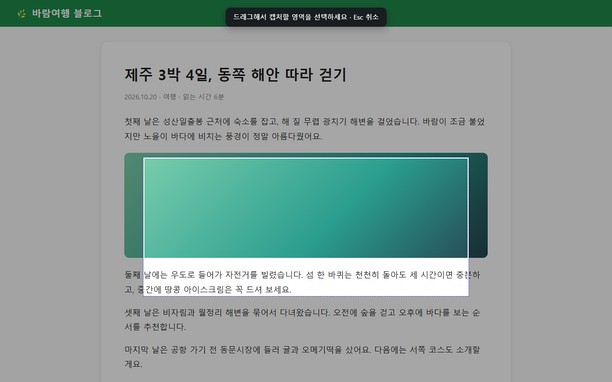
✔ Area capture: drag to capture just the part you want
✔ Full text: grab all text on the page at once
✔ Area text: click the part you want
✔ Save results as PNG / TXT or copy them to the clipboard
■ Convenience
✔ Shortcuts: set any key combination for each feature (default Alt+1 – Alt+5)
- You'll be told right away if another extension uses the same keys
✔ Right-click menu: run any feature from the page menu (long-press on Windows tablets)
✔ Touch & pen: select areas with S Pen, Surface Pen and more
✔ Languages: Auto (browser language) / 한국어 / English / 日本語 / 中文 / Español
✔ Themes: System / Light / Dark
✔ Permissions: turn any permission off and on whenever you like
✔ Helpful notices only when something can't work — nothing pops up on sites where it works
━━━━━━━━━━━━━━━━━━
■ How to use
━━━━━━━━━━━━━━━━━━
1. After installing, click the puzzle (🧩) icon next to the address bar and pin DragFree RightClick (📌)
2. On a blocked page, click the icon → [Unlock this page] (or Alt+1)
3. To restore it, click the same button, now [Restrict again] (or Alt+1 again)
4. Want it always on? Turn on [Auto unlock]
5. Capture & text: [Full capture] [Area capture] [Full text] [Area text]
→ the result opens in a new tab → [Save] or [Copy]
6. Language, theme, shortcuts and permissions: the gear (⚙) at the top right of the popup
※ Tabs that were open before installing need one refresh (F5) for shortcuts to work.
※ Browser pages (settings, new tab) and extension stores can't be used, by browser policy.
※ Text that is part of an image can't be extracted — use Area capture instead.
━━━━━━━━━━━━━━━━━━
■ Supported
━━━━━━━━━━━━━━━━━━
Chrome · Edge · Whale · Firefox · Opera
Windows / macOS / Linux / ChromeOS — desktops, laptops and Windows tablets
Also installable on Firefox for Android.
(Mobile Chrome / Whale and iPhone / iPad browsers don't support extensions.)
■ Privacy
No data is collected or sent anywhere. No ads, no tracking — everything runs locally in your browser.


 Opera-Browser erforderlich.