需要 Opera 瀏覽器。
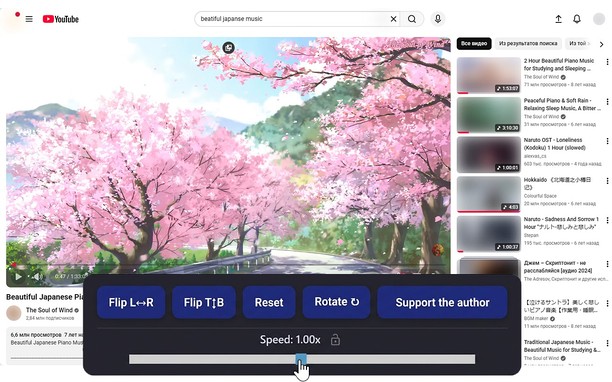
Reflects video vertically and horizontally, speeds up or slows down playback, rotates by 90°, and compresses video height and width — useful for fixing distorted videos.
How it works
Hotkeys:
Alt + * (NumPad): Show/hide control panel.
Alt + 1 / 3 (NumPad): Decrease or increase playback speed (step 0.01).
🔒 Lock near the speed — if you click it, it will remember any changed speed for the entire domain.
Alt + 4 / 6 (NumPad): Compress or stretch the frame horizontally.
Alt + 2 / 8 (NumPad): Compress or stretch the frame vertically.
Alt + 5 (NumPad): Reset all settings.
Alt + 7 (NumPad): Decrease frame size on both axes.
Alt + 9 (NumPad): Increase frame size on both axes.
Alt + 0 (NumPad): Rotate video 90°.
Compatibility:
Works on almost all sites.
Works in full-screen mode.
- 這個延伸套件能存取你所有網站的資料。
螢幕截圖
關於延伸套件
Related
-
Import bookmarks to Atavi.com
从浏览器中将您的书签导入至Atavi书签管理器
評分: 評分的總次數: 11
-
Fake Data
Fill form input fields with fake random data.
評分: 評分的總次數: 4
-
Atavi bookmarks
书签与所有的设备和浏览器同步
評分: 評分的總次數: 168
-
Evernote Web Clipper
使用 Evernote 擴充套件,將您在網路上的所見所聞儲存至 Evernote 帳戶。
評分: 評分的總次數: 588
-
YouTube™ No Buffer (Stop Auto-playing)
Prevents YouTube HTML5 and Flash players from auto-buffering (auto-playing) videos
評分: 評分的總次數: 33