需要 Opera 瀏覽器。
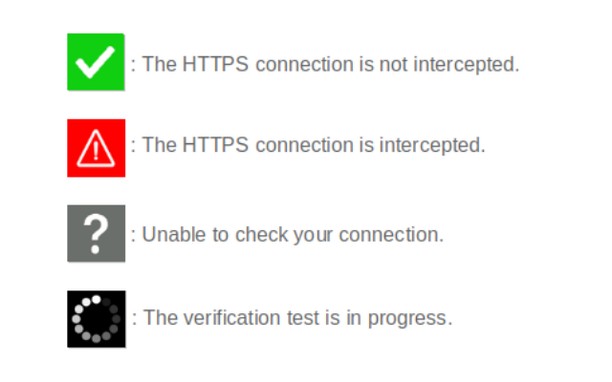
When browsing on secured sites ("https://..." websites), you can check the security status by clicking on the extension icon.
- The icon is green : your connection is not compromised;
- The icon is red : your connection is considered very risky (hijacked, modified, listened);
- The icon is gray : the verification is impossible (check server is unreachable, network error);
- The icon is black : the verification is in progress.
Technical details :
Normally, before encrypting an HTTPS connection, a secure website must prove its identity to your browser by sending it its security certificate. This certificate can be considered as an identity card issued by higher authorities (Certificate Authorities). There are several techniques of usurpation based on false certificates (false identity cards) or homographers (false names) to make you believe that a pirate site is the legitimate site you think you are visiting. These techniques allow pirate sites to retrieve your private information.
CheckMyHTTPS allows you to detect this type of practice, which can be implemented on open networks (WiFi in hotels, conference centers, stations, etc.) or even within your company via its firewall (SSL inspection). To detect this, the extension compares the certificate of the visited site that is received by your browser with the same certificate retrieved by an external check server located on the Internet. If the certificates differ, the identity of the server can be considered as usurped (red icon).
Respect for privacy :
The CheckMyHTTPS extension requires to send only two parameters to the check server :
- The domain name of the visited website;
- The IP address of the visited website.
You have free choice regarding the website to check.
Moreover, we give you the possibility to be free regarding the check server as you can make and host your own.
All explanations are detailed on the https://checkmyhttps.net project website.
- 這個延伸套件能存取你所有網站的資料。
- This extension can create rich notifications and display them to you in the system tray.
- 這個延伸套件能存取你的頁籤與瀏覽活動。
螢幕截圖
關於延伸套件
- 下載次數
- 1519
- 分類
- 生產應用
- 版本
- 5.7.3
- 大小
- 316.1 KB
- Last update
- March 13, 2026
- 使用者授權條款
- 隱私權政策
- 提供服務的網站
- https://checkmyhttps.net/
- 支援網頁
- https://github.com/checkmyhttps/checkmyhttps/issues
- 原始碼頁面
- https://github.com/checkmyhttps/checkmyhttps/tree/master/Chromium
Related
-
Evernote Web Clipper
使用 Evernote 擴充套件,將您在網路上的所見所聞儲存至 Evernote 帳戶。
評分: 評分的總次數: 630
-
Import bookmarks to Atavi.com
从浏览器中将您的书签导入至Atavi书签管理器
評分: 評分的總次數: 11
-
iCloud™ Notifier
Get Badge notification for iCloud and instant access to your inbox with just one click.
評分: 評分的總次數: 14
-
Jumble Solver & Answers
Instantly unscramble letters to find valid words. Includes daily Jumble answers.
評分: 評分的總次數: 0
-
Atavi bookmarks
书签与所有的设备和浏览器同步
評分: 評分的總次數: 173