需要 Opera 瀏覽器。
Audio Converter is an add-on that help you easily convert an audio format to another.
It uses FFmpeg library which is compiled from C and C++ language to JavaScript with Emscripten compiler. Emscripten is a source-to-source compiler that can compile native C/C++ codes to JavaScript language. Please read this Wikipedia page to get more info about Emscripten compiler.
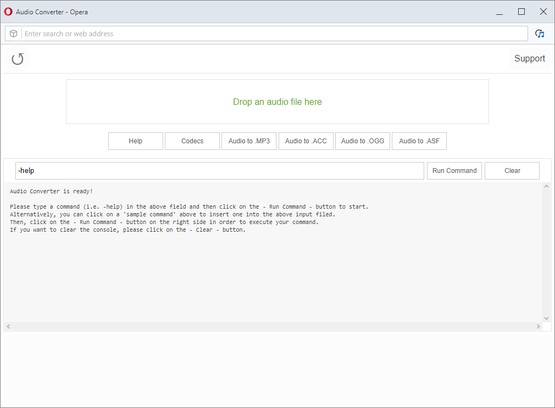
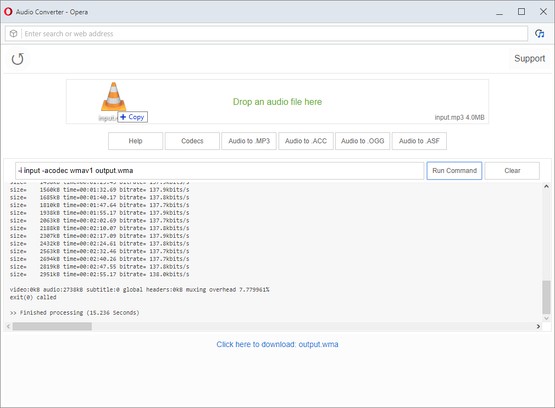
In order to work with this add-on, simply open the app UI and drag an audio file to the designated area in the app (top section). Then, type your FFmpeg command in the input area and press on the - Run Command - button. Once the conversion is done, the link to download the audio file will be available at the bottom of the UI.
Please note that, conversion may take some time depending on the audio size and also type of the conversion that you choose. There are some sample commands available in the app UI which you can choose to start working with this add-on.
Note: since this add-on runs FFmpeg in the browser, it runs slower than the native FFmpeg applications/library. However, using the add-on is very easy. Simply add it to your browser and it starts to work without any additional plugins. It is only suitable for simple conversions and has limited number of codecs.
This add-on is specifically designed for "audio" conversion. If you want to convert a "video" file, please use my other add-on Video Converter (https://addons.opera.com/en/extensions/details/video-converter/).
Note: in order to report bugs, please fill the bug report form in the addon's homepage (http://mybrowseraddon.com/audio-converter.html).
螢幕截圖
關於延伸套件
- 下載次數
- 10397
- 分類
- 生產應用
- 版本
- 0.1.2
- 大小
- 1.5 MB
- Last update
- Sept. 6, 2019
- 使用者授權條款
- Copyright 2019 loorisvalf
- 支援網頁
- http://mybrowseraddon.com/audio-converter.html
Related
-
Atavi bookmarks
书签与所有的设备和浏览器同步
評分: 評分的總次數: 174
-
Transmission easy client
扩展添加Transmission的网页图形用户界面在网页浏览器
評分: 評分的總次數: 21
-
Free Online Image Resizer
Free Online Image Resizer is a lightweight browser extension that allows you to quickly resize images without leaving your browser. With an elegant, user-friendly interface, you can adjust image dimensions with just a few clicks and download the resized images instantly. Perfect for social media posts, web graphics, or any situation where you need to quickly adjust image sizes.
評分: 評分的總次數: 2
-
Evernote Web Clipper
使用 Evernote 擴充套件,將您在網路上的所見所聞儲存至 Evernote 帳戶。
評分: 評分的總次數: 630
-
LightPhoto Editing
Basic photo editing tools. Get online image with context menu to edit with basic tools
評分: 評分的總次數: 3