需要使用 Opera 浏览器。
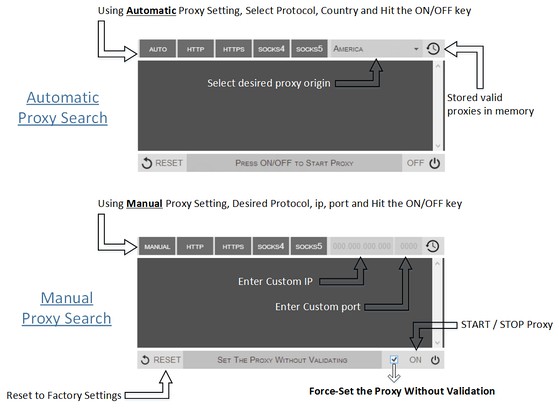
Proxy Finder (IP Switcher) is an Opera extension which automatically switches an Internet connection across one or more proxy servers. Put simply, Proxy Finder automates the manual process of editing Opera's Proxy Settings dialog. Proxy server switching occurs based on the Manual or Automatic mode you define.
In the manual mode (default) you need to choose a protocol (http, https, socks4, or socks5) and enter a desired IP and Port, then press ON/OFF button to start the proxy. For the automatic mode, the extension uses its online server to search for a working proxy based on the protocol(s) and origin you have chosen.
Moreover, animated icons show you when a proxy is in use. Advanced logging shows you which proxies were used. If you have any question or concern, feel free to contact me via the following address: philip[dot]tholus[at]gmail.com
- 此扩展可访问您在所有网站上的数据。
- 此扩展将管理您的扩展。
- 此扩展可访问您的代理服务器设置。
- 此扩展可访问您的标签和浏览活动。
屏幕截图
关于此扩展
- 下载次数
- 89127
- 类别
- 效率
- 版本
- 0.1.3
- 大小
- 52.8 KB
- Last update
- Sept. 9, 2014
- 许可证
- Copyright 2014 philiptholus
相关
-
AutoTabRefresh
Refresh your browser tab automatically at the desired interval.
评分: 总评分次数: 16
-
PNG Optimizer
Optimize PNG images and reduce the file size right in your browser!
评分: 总评分次数: 6
-
Color Temperature (Change Lux)
A lite and easy-to-use addon that adjusts the screen color to match the environment!
评分: 总评分次数: 10
-
Boomerang for Gmail™
Allows you to schedule messages to be sent or returned at a later date.
评分: 总评分次数: 46
-
Evernote Web Clipper
使用Evernote扩展程序一键保存精彩网页内容到Evernote帐户。
评分: 总评分次数: 549