


 Kailangan ang browser ng Opera.
- Ma-a-access ng extension na ito ang aktibidad ng iyong mga tab at pagba-browse.
Mga screenshot

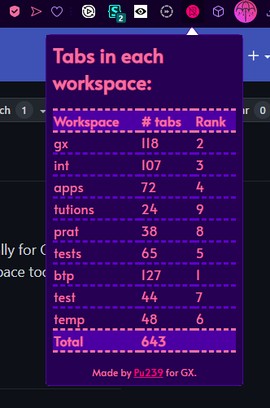
Tungkol sa extension
- Mga download
- 1657
- Kategorya
- Pagiging produktibo
- Bersyon
- 1.0
- Laki
- 67.8 KB
- Last update
- May 30, 2023
- Lisensya
- Patakaran ng Pagkapribado
- Pahina ng suporta
- https://github.com/plutonium-239/workspaces-tab-counter/issues
- Pahina ng source code
- https://github.com/plutonium-239/workspaces-tab-counter
Related
-

Gmail™ Panel (and Notifier)
Easy access to Gmail via toolbar-popup UI, plus, get badge notifications.
-

Evernote Web Clipper
Use the Evernote extension to save things you see on the web into your Evernote account.
-

GCQRCode
Adds a QR code to every listing page.
-

Yaware.TimeTracker Url Monitor
Time Tracker unit for monitoring URL in browsers
-

Boomerang for Gmail™
Allows you to schedule messages to be sent or returned at a later date.