Kailangan ang browser ng Opera.
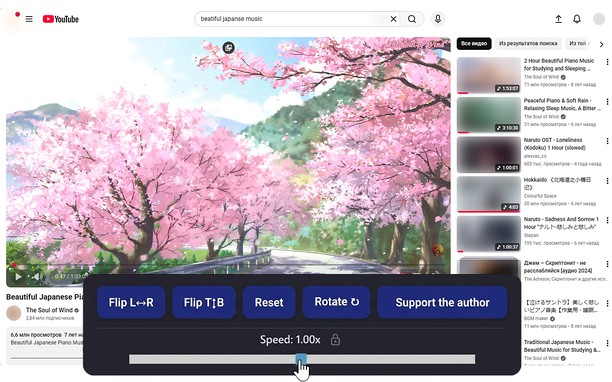
Reflects video vertically and horizontally, speeds up or slows down playback, rotates by 90°, and compresses video height and width — useful for fixing distorted videos.
How it works
Hotkeys:
Alt + * (NumPad): Show/hide control panel.
Alt + 1 / 3 (NumPad): Decrease or increase playback speed (step 0.01).
🔒 Lock near the speed — if you click it, it will remember any changed speed for the entire domain.
Alt + 4 / 6 (NumPad): Compress or stretch the frame horizontally.
Alt + 2 / 8 (NumPad): Compress or stretch the frame vertically.
Alt + 5 (NumPad): Reset all settings.
Alt + 7 (NumPad): Decrease frame size on both axes.
Alt + 9 (NumPad): Increase frame size on both axes.
Alt + 0 (NumPad): Rotate video 90°.
Compatibility:
Works on almost all sites.
Works in full-screen mode.
- Ma-a-access ng extension na ito ang iyong data sa lahat ng website.
Screenshot
Tungkol sa extension
- Mga download
- 7912
- Kategorya
- Pagiging produktibo
- Bersyon
- 1.4.0
- Laki
- 60.3 KB
- Last update
- Feb. 17, 2026
- Lisensya
- Patakaran ng Pagkapribado
Related
-
Atavi bookmarks
Visual bookmarks, bookmarks sync across various browsers and absolute safety for your bookmarks
Rating: Kabuuang bilang ng mga rating: 173
-
Evernote Web Clipper
Use the Evernote extension to save things you see on the web into your Evernote account.
Rating: Kabuuang bilang ng mga rating: 634
-
MyIPCam
Easy and quick way to view and control your IP-cameras
Rating: Kabuuang bilang ng mga rating: 30
-
Distill Web Monitor
Monitor webpage or feed for changes. Get SMS and email alerts on change detection.
Rating: Kabuuang bilang ng mga rating: 50
-
Universal VAT Calculator
Add VAT to a price or take VAT off a price in a few keystrokes with our handy universal VAT calculator
Rating: Kabuuang bilang ng mga rating: 2