Kailangan ang browser ng Opera.
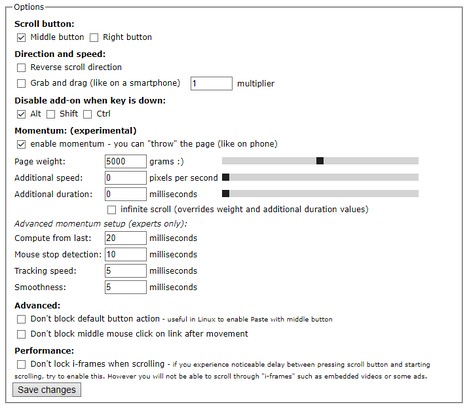
Scroll Anywhere enables you to drag scrollbar with your middle (or right) mouse button without touching a scrollbar.
Just hold the middle button and move mouse up-down or left-right.
You can also change the behavior to simple "grab and drag" style.
Supports also Momentum - ability to throw the page (like on your phone) - including infinite scrolling option.
Now with the option to change the cursor while scrolling!
Warning: very addictive! :)
Preview: https://fastaddons.com
Known issues:
- does not work HERE on https://addons.opera.com/en/extensions/ (blocked by Opera)
- does not work on browser specific pages like "History" or "Extensions" (blocked by Opera)
- does not work on other extensions pages like options page of some addon (blocked by Opera)
- in Linux right click (context menu) cannot be canceled so only middle button is working correctly
Note:
I'm developing this add-on in my free time for you for free.
Please consider supporting my work by becoming my patron:
https://www.patreon.com/fastaddons
Or by donation:
https://paypal.me/fastaddons
Thank you :)
- Ma-a-access ng extension na ito ang iyong data sa lahat ng website.
Mga screenshot
Tungkol sa extension
- Mga download
- 19323
- Kategorya
- Pagiging produktibo
- Bersyon
- 6.5.2
- Laki
- 111.6 KB
- Last update
- April 11, 2019
- Lisensya
- Patakaran ng Pagkapribado
- Pahina ng suporta
- https://fastaddons.com/
Related
-
Atavi bookmarks
Visual bookmarks, bookmarks sync across various browsers and absolute safety for your bookmarks
Rating: Kabuuang bilang ng mga rating: 160
-
Percentage Calculator
Calculate Percentage value by applying percentage on an amount. Also calculates final amount by adding percent amount
Rating: Kabuuang bilang ng mga rating: 2
-
techzgaming.com
The concept of Techz Gaming is to provide the best recommendations based on honest reviews. It aims to guide and address users’ inquiries about various technology products, including motherboards, laptops, gadgets, and processors.
Rating: Kabuuang bilang ng mga rating: 0
-
Evernote Web Clipper
Use the Evernote extension to save things you see on the web into your Evernote account.
Rating: Kabuuang bilang ng mga rating: 553
-
Page timer
place a timer into a webpage which will bring the page back at the end of the timer
Rating: Kabuuang bilang ng mga rating: 10