Kailangan ang browser ng Opera.
Screen Recorder addon helps you record video from the computer's screen.
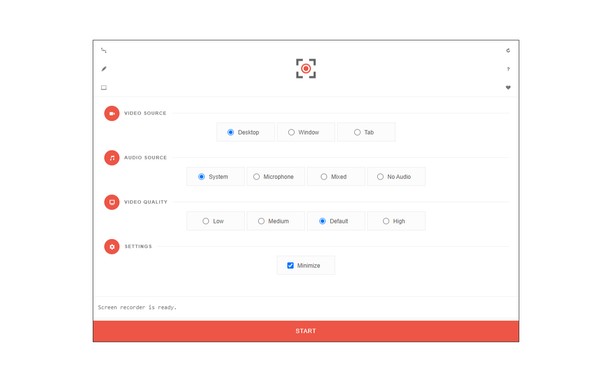
To work with this addon, please click on the toolbar button. Once the recorder interface appears, please adjust desired options, and then click the - Start - button. The video source could be your screen, window, or tab. The audio source can be the system's audio, microphone, mixed, or no audio at all. When you click the start button, a popup will appear within the interface. This popup window allows you to select the desired screen, tab, or window. To start recording please click on the - Share - button. When you are done recording the screen, please press the toolbar button (or the stop button on the app interface) to stop the recording process. The recorded video will be download to your computer automatically (on the default download location).
By default, recorded media is in - webm - format. To get more information about webm video format, please visit this Wikipedia page (https://en.wikipedia.org/wiki/WebM). If you want to change this format to a different one, please use a different software.
To report bugs, please fill the bug report form on the addon's homepage (https://mybrowseraddon.com/screen-recorder.html).
- Makukuha ng extension na ito ang nilalaman ng buong screen o ng indibidwal na tab at Windows.
- This extension can store an unlimited amount of client-side data.
Mga screenshot
Tungkol sa extension
- Mga download
- 59171
- Kategorya
- Pagiging produktibo
- Bersyon
- 0.1.5
- Laki
- 41.6 KB
- Last update
- Feb. 1, 2023
- Lisensya
- Copyright 2021 moristong
- Pahina ng suporta
- https://mybrowseraddon.com/screen-recorder.html
Related
-
Evernote Web Clipper
Use the Evernote extension to save things you see on the web into your Evernote account.
Rating: Kabuuang bilang ng mga rating: 549
-
CMeter
Activates Content Meter library for web-pages.
Rating: Kabuuang bilang ng mga rating: 11
-
Turn Off YouTube Autoplay Next & Annotations
Turn off YouTube autoplay next video and disable YouTube annotations on videos.
Rating: Kabuuang bilang ng mga rating: 7
-
Open in Sumatra PDF and DJVU Reader
Adds a context menu item to send PDF links directly to Sumatra PDF
Rating: Kabuuang bilang ng mga rating: 5
-
Boomerang for Gmail™
Allows you to schedule messages to be sent or returned at a later date.
Rating: Kabuuang bilang ng mga rating: 46