


 Kailangan ang browser ng Opera.
- Ma-a-access ng extension na ito ang iyong data sa lahat ng website.
- Pangangasiwaan ng extension na ito ang iyong mga extension.
- Ma-a-access ng extension na ito ang mga setting ng iyong proxy.
- Ma-a-access ng extension na ito ang aktibidad ng iyong mga tab at pagba-browse.
Mga screenshot

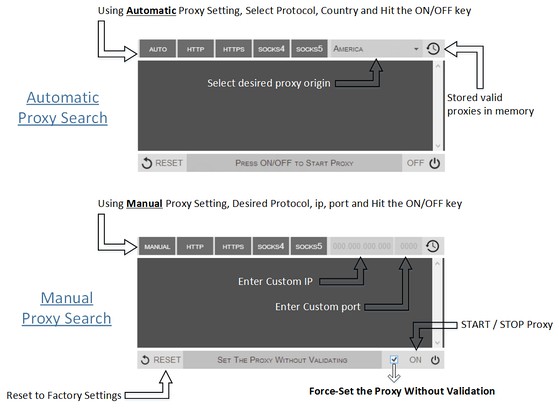

Tungkol sa extension
- Mga download
- 88831
- Kategorya
- Pagiging produktibo
- Bersyon
- 0.1.3
- Laki
- 52.8 KB
- Last update
- Sept. 9, 2014
- Lisensya
- Copyright 2014 philiptholus
Related
-

Enable Backspace
Enable backspace navigation with just one click!
-

JavaScript Toggle On and Off
Toggle JavaScript engines (inline, data URL, remote, and external) on and off the easy way
-

Atavi bookmarks
Visual bookmarks, bookmarks sync across various browsers and absolute safety for your bookmarks
-

My Google Bookmarks
This simple extension adds a link to your Google Bookmarks.
-

Evernote Web Clipper
Use the Evernote extension to save things you see on the web into your Evernote account.