Kailangan ang browser ng Opera.
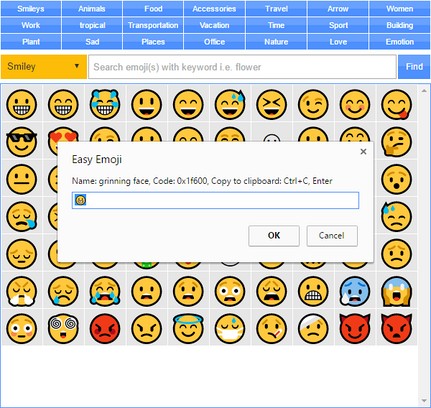
Easy Emoji addon lets you find and copy desired emoji from your Opera's toolbar popup UI with just one click.
Some important features:
1. Over 1800 emojis to choose from.
2. Toolbar popup has a built-in finder to search and find desired emojis.
3. Click on each emoji to see details and copy the icon to clipboard.
4. No settings or options to adjust.
Note 1: in order to copy each emoji icon, simply click on it. The emoji will be copied to the clipboard automatically.
Note 2: depending on your browser's version and operating systems, some emoji icons may not render properly.
Note 3: in order to report bugs, please fill the bug report form in the addon's homepage (http://mybrowseraddon.com/easy-emoji.html).
- This extension can write data into the clipboard.
Mga screenshot
Tungkol sa extension
- Mga download
- 16427
- Kategorya
- Social
- Bersyon
- 0.1.3
- Laki
- 52.9 KB
- Last update
- Aug. 2, 2019
- Lisensya
- Copyright 2019 moristong
- Pahina ng suporta
- http://mybrowseraddon.com/easy-emoji.html
Related
-
Twitch Text Emotes - temotes
Save your favorite text phrases ("LULW", "KEKW", emoticons, etc.) directly into the standard Twitch Emotes panel and use them in Twitch chat. Simple and useful.
Rating: Kabuuang bilang ng mga rating: 9
-
POI pocket
Create new POI in www.poipocket.com. Select text (address, GPS coordinates...),right click and choose Create POI.
Rating: Kabuuang bilang ng mga rating: 1
-
WoW Collector
Rating: Kabuuang bilang ng mga rating: 0
-
Pogo PinIt
Monetize your Pinterest Pins and engage people with targeted conversations about the things they love.
Rating: Kabuuang bilang ng mga rating: 2
-
Minecraft Server Info
This extension allows you to see who's online right now on a Minecraft server. Directly from your browser!
Rating: Kabuuang bilang ng mga rating: 23